







2024.02.16
2026.06.29
Easy-to-Understand Explanation of Information Security Measures in Telework!
-
Category
Recommended Articles
-
What is Vyond? Introducing the benefits of an animation video production tool that can be used for business.
-
[Animation Teaching Material Production] How to Create e-Learning Materials ②
-
How does Vyond differ from other animation production software? Comparison and recommendations
-
Can Vyond animations be used as teaching materials? Here are the benefits of using them in e-learning and training.
-
Let's create business animations with Vyond! An explanation of the reasons and benefits recommended for business, as well as challenges.
-
Vyond Go (AI Video Generation) Tips and Best Practices ① Vyond Go Setup Guidelines
-
Moodle Basic Course: What is Moodle?
-
[Moodle Basic Course] What can the e-learning management system Moodle do?
-
[Moodle Basic Course] What can be done with Moodle's default features
-
Benefits and Considerations of Moodle Cloud Services
-
Moodle is not only used by universities (widespread use)


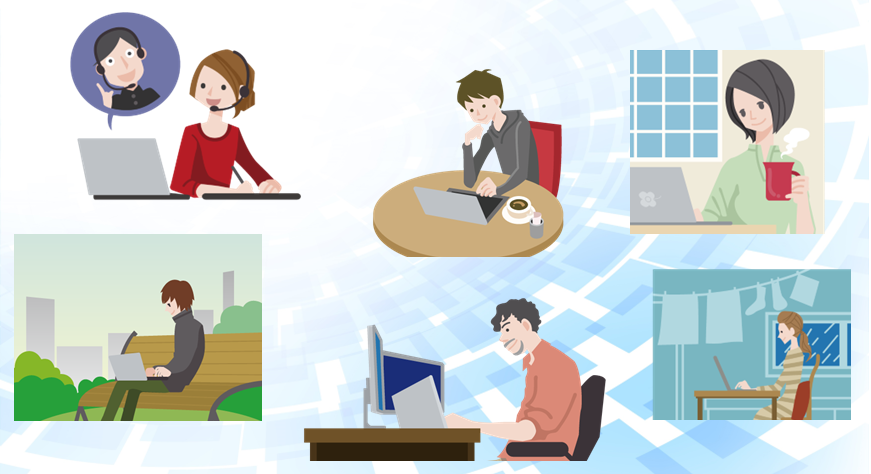
In today's world, with high-speed internet networks, high-performance devices, and dedicated tools, it is possible to work from home in an environment equivalent to the office. Telework, a flexible work style free from time and location constraints, has become established as a common way of working following the COVID-19 pandemic.
There are many benefits to telework, such as improving employees' quality of life and reducing company costs; however, on the other hand, there are also concerns regarding information security, including the loss or theft of devices such as computers and information leaks caused by using unsecured free Wi-Fi.
This time, we will discuss "Information Security in Telework" as a theme, explaining the risks associated with telework and their countermeasures. We hope this leads to an increased awareness of security unique to telework, which differs from the office environment.
1. Differences in Security Environments Between Office and Telework
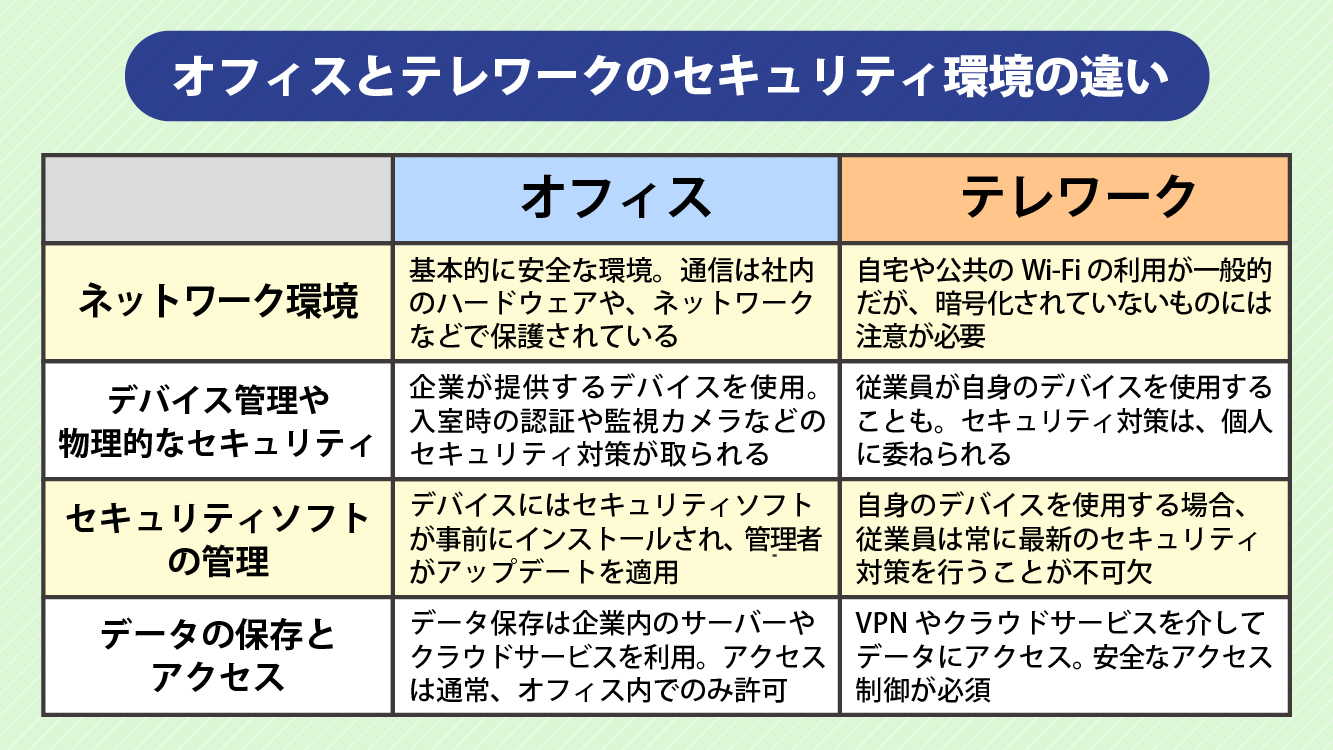
The working environment and security environment differ between the office and telework. Let's first organize these points.
Different Section.1 Network Environment
● Office
In the office, a secure corporate network is basically provided, and access to internal servers and databases is controlled. Additionally, communications are protected by hardware and networks within the office.
●Telework
Work is conducted from various locations where internet access is available, such as at home, coworking spaces, and cafes. Therefore, it is common to use home or public Wi-Fi, but caution is necessary as some of these networks may not be encrypted.
Different Parts.2 Device Management and Physical Security
●Office
In the office, devices lent or provided by the company are used for work. These devices are managed based on security policies. Additionally, physical security measures are implemented within the office, such as authentication upon entry, installation of surveillance cameras, shredders, and locking up devices for storage.
●Telework
In telework, employees may use devices they personally own. Since they are away from the office's robust security environment, device management and physical security measures are entrusted to the individual.
Different Section.3 Management of Security Software
●Office
The devices in the office come pre-installed with designated security software, and administrators apply updates as needed.
●Telework
Since employees manage their own devices, the installation and updating of security software is the responsibility of the individual. Employees must always implement the latest security measures.
Section 4: Data Storage and Access
●Office
Data storage is generally carried out using in-house servers or cloud services. Access is usually permitted only within the office, and access rights are controlled by administrators.
●Telework
In telework, data is accessed via VPN or cloud services. Since internal data is accessed from outside locations such as employees' homes, secure access control is essential.
Private spaces like homes or public facilities differ from offices where colleagues are present, which can lead to a lapse in vigilance. Consequently, the likelihood of information security-related issues occurring increases.
* For more detailed explanations about corporate information security, please refer to the following blog.
>What is Information Security Education? From Implementation Methods to Steps for Creating Teaching Materials and How to Create e-Learning Materials!
2. What are the information security risks in telework?

What kind of information security risks are of concern in telework? Here, we will list the possible risks.
Risk.1 Loss or Theft of Devices
In telework, there is a risk of loss or theft when using business laptops outside the company. In particular, external hard drives and USB memory sticks used to carry data are smaller than laptops, increasing the risk.
Risk.2 Eavesdropping of Data by Third Parties
Wi-Fi provided in public facilities and restaurants is sometimes not encrypted. Therefore, keep in mind the risk of data eavesdropping by third parties. Of course, even home Wi-Fi can pose the same risk if encryption is not set up.
Risk.3 Insufficient Measures for Personal Devices
Management of personal devices is left to the individual. Therefore, some devices may lack security software or may already be infected with malware through free software. This can lead to the risk of data leakage.
Risk.4 Information Leakage at Home
When working from home, there is a risk that family members or housemates may come into contact with personal information or confidential data, such as a family member using the work PC or a child taking printed data out. Furthermore, if printed data is simply thrown away as garbage, there is also a risk of information leaking to third parties.
Risk.5 Recovery Takes Time
Mistakes such as losing business data or accidentally deleting it can happen anywhere, but in telework, recovery often takes longer because there are no reliable colleagues nearby.
Failing to recognize the risks of telework and neglecting information security measures can lead to serious incidents, such as data breaches, PC takeovers, and the spread of viruses. As a result, it is possible that not only individual employees but also, in some cases, the entire company and society as a whole may be affected.
3. Three Measures to Prevent Information Security Risks in Telework
While telework enables a convenient and flexible way of working, it also increases information security risks due to access from outside the company and working in a home environment. Here, we introduce three basic measures to minimize those risks.
Measure 1: Establish and Comply with Rules
The first important step is to clearly establish security rules as a company. At the core of this is the "Security Guidelines (Information Security Related Regulations)."
● Security Guidelines
Security guidelines are documents that summarize policies and behavioral guidelines related to information security. By creating them, the organization can maintain and ensure a unified level of security. The main components are as follows.
① Security Policy (Basic Policy)
This is the fundamental document that outlines the company's approach to information security.
② Security Standard (Countermeasure Criteria)
This document defines what should be implemented and what must be adhered to based on the basic policy.
③ Security Procedures (Implementation Details)
This document outlines the specific steps to execute the matters stipulated in the security standards.
Since these vary depending on corporate philosophy, management strategy, business scale, industry, and business type, it is important to establish security guidelines that fit your own company.
●Key Points for Operating Security Guidelines
(Point 1) Clarify the Person Responsible and Establish a Management System
By clearly defining responsibility, responses to incidents become quicker and more accurate, leading to improved effectiveness across the entire organization.
(Point 2) Conduct regular reviews to respond to changes in the environment and threats
IT environments and cyberattack methods are constantly evolving. By regularly reviewing the rules, you can prepare for the latest risks.
(Point 3) Continuously provide employee education based on the security guidelines
By repeatedly educating employees with the latest information so that each individual has the correct knowledge and can act promptly, the rules will not become mere formalities but will be firmly established.
〈Measure 2〉Each Employee Acquires Knowledge and Changes Their Awareness
No matter how well rules and systems are established, risks remain if the awareness of employees actually engaged in work is low. Therefore, it is necessary to acquire knowledge and create an environment where security is constantly kept in mind. Training is crucial in this regard.
●Key Points of Training
(Point 1) Conduct Continuous Training
By holding training sessions regularly rather than as one-offs, you can both solidify knowledge and keep up with the latest trends. In particular, e-learning, which can be taken regardless of location or time, is highly compatible with telework.
(Point 2) Utilize Internal Information Dissemination
It is also effective to use portals, chat tools, emails, and other means to share alerts and the latest security information, thereby continuously raising employees' awareness on a daily basis.
〈Measure 3〉Do Not Neglect Technical Measures
Technical measures in systems and tools are also indispensable. Specific countermeasures will be explained in detail in the next chapter.
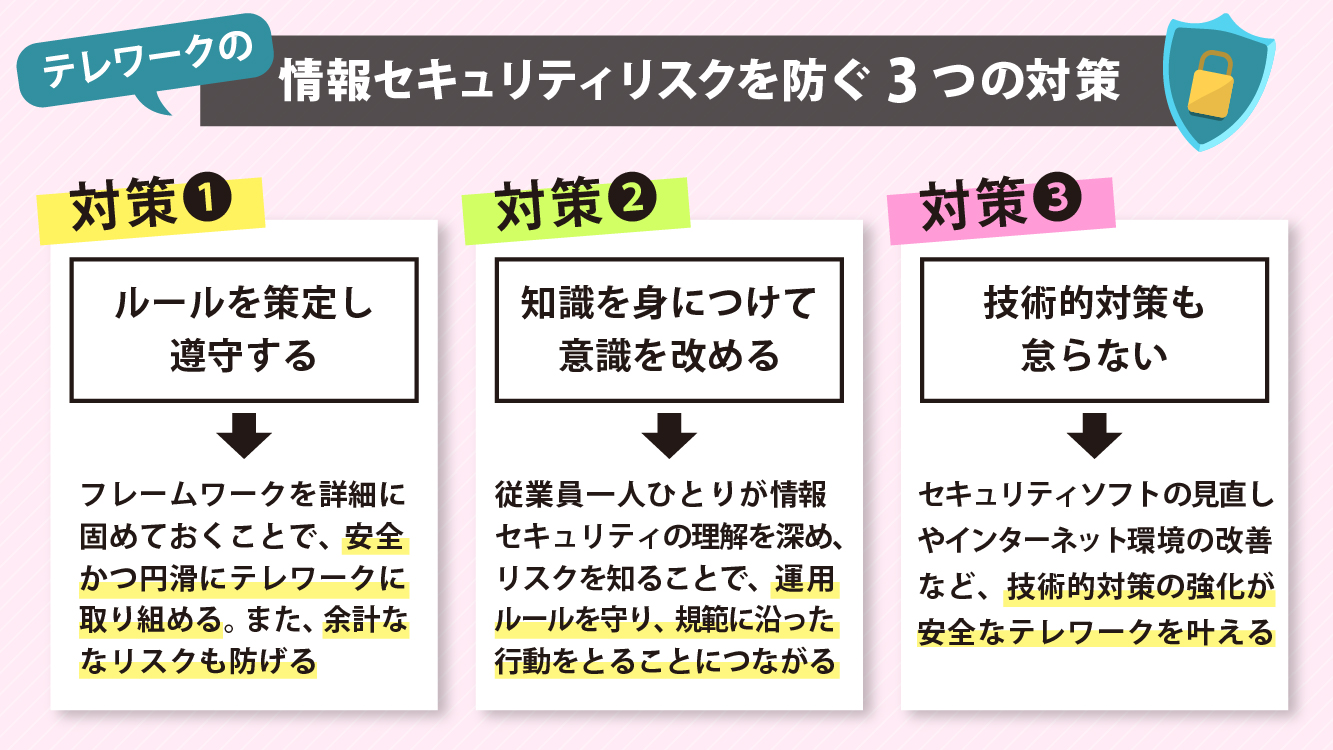
By combining these three measures, it is expected that security risks inherent in telework can be effectively prevented.
4. Technical Measures to Prevent Information Security Risks in Telework
Alongside rules and training, "technical security measures" are indispensable. Here, we introduce representative measures.
〈Technical Measure 1〉Measures for Physical Devices
PCs and mobile devices are particularly vulnerable targets in telework environments where they are frequently taken out. The following measures can be considered.
・Clearly define rules for taking devices off-site
・Avoid unnecessary removal of devices
・Implement a system that allows remote data deletion in case of loss or theft
〈Technical Measure.2〉Virus Protection and Vulnerability Countermeasures
Cyberattacks are becoming increasingly sophisticated every day. Since software vulnerabilities are often exploited, be sure not to neglect the following basic countermeasures.
・Always update the OS and software to the latest versions
・Promptly apply patches
・Install security software and keep files up to date
〈Technical Measure.3〉Access Restrictions and Authorization
To prevent unauthorized access, it is also important to establish connection rules for the internal network. Implementing the following measures helps prevent misuse.
・Introduction of VPN and Zero Trust
・Restriction of source IP addresses
・Control of access scope according to permissions
〈Technical Measure 4〉Encryption of Personal Information and Communications
Data sent and received from external environments is at risk of eavesdropping and tampering. Thoroughly encrypting communications, as well as encrypting data stored on devices, prevents information leaks.
〈Technical Measures.5〉Account Authentication Management
Since unauthorized use of accounts can lead to significant damage, strict management is necessary. Security can be enhanced by setting a strong password policy with regular updates, canceling unnecessary services, and deleting dormant accounts.
〈Technical Measure.6〉Log Collection and Regular Backups
Collecting activity logs and system logs is very effective in preparation for any unforeseen troubles. Additionally, performing regular data backups is also important to safeguard against data loss caused by disasters or attacks.
These technical measures require continuous operation and improvement. By combining them with rules and education, the security of telework environments can be greatly strengthened and enhanced.
5. Summary
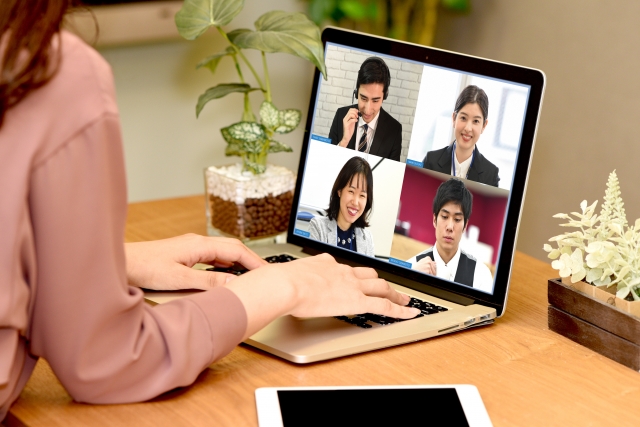
Telework enables flexible working styles, but it is important to pay even more attention to information security than in the office. Additionally, since work is done in places out of the sight of supervisors and managers, it is a crucial key that each employee fully understands their responsibility for security and deepens their knowledge.
Therefore, we recommend e-learning. E-learning, which allows for learning regardless of time and place, is a great match for telework. Employees can easily learn about information security knowledge in telework at their convenience.
At Human Science, we offer a variety of e-learning materials related to information security. Among them, the course specialized for telework, "Information Security for Telework and Remote Work," provides a detailed explanation of concrete and practical security measures, including how to manage devices, how to organize the working environment, and preparations for emergencies.
For more details, please refer to the e-learning site of Human Science Co., Ltd.
Supervisor Information