







2025.03.05
2026.06.12
What are the benefits of adopting e-learning for in-house training? We will also introduce challenges and key points for successful e-learning training.

-
Category
Recommended Articles
-
What is Vyond? Introducing the benefits of an animation video production tool that can be used for business.
-
[Animation Teaching Material Production] How to Create e-Learning Materials ②
-
How does Vyond differ from other animation production software? Comparison and recommendations
-
Can Vyond animations be used as teaching materials? Here are the benefits of using them in e-learning and training.
-
Let's create business animations with Vyond! An explanation of the reasons and benefits recommended for business, as well as challenges.
-
Vyond Go (AI Video Generation) Tips and Best Practices ① Vyond Go Setup Guidelines
-
Moodle Basic Course: What is Moodle?
-
[Moodle Basic Course] What can the e-learning management system Moodle do?
-
[Moodle Basic Course] What can be done with Moodle's default features
-
Benefits and Considerations of Moodle Cloud Services
-
Moodle is not only used by universities (widespread use)



More companies are adopting e-learning for in-house training. Behind this trend are many advantages, such as the efficiency of allowing learners to study at their own pace and the flexibility of not being restricted by time or place. To maximize the learning effectiveness of such e-learning, there are several key points to keep in mind.
This time, we will provide detailed information on the benefits of incorporating e-learning into in-house training, the challenges when utilizing it, and useful tools for creating training materials. Please make use of this to achieve effective in-house training.
Table of Contents
1. What is e-Learning?
2. Benefits of Adopting e-Learning for In-House Training
3. Drawbacks of Adopting e-Learning for In-House Training
4. Areas and Cases Where e-Learning Excels
5. Examples of Training Best Suited for e-Learning
6. Success Points When Incorporating e-Learning into In-House Training
7. Introduction to the Recommended e-Learning Content Creation Tool "iSpring Suite"
8. Summary
1. What is e-Learning?

First, let's grasp the overview of e-Learning.
● What is e-Learning?
e-Learning is a form of learning that uses electronic devices such as computers, smartphones, and tablets to acquire knowledge via the internet. The "e" stands for electric, and "learning" means learning.
e-Learning generally involves using online courses or training programs. Learners can access the content and study at their own pace, at a convenient time and place. Unlike one-time seminars, a key advantage is that learners can review the material repeatedly. Additionally, because e-learning can incorporate interactive elements, it offers benefits such as improved learning outcomes, higher participation rates, and increased completion rates.
●Background of e-Learning Utilization
e-Learning is utilized in various fields such as school education and corporate training. Examples include online universities, vocational schools, and internal corporate training programs. The background for its utilization includes improvements in communication environments and the widespread use of electronic devices. Additionally, due to the spread of the novel coronavirus, the demand for e-Learning that can be done at home has surged in recent years.
2. Benefits of Adopting e-Learning for In-House Training

Here, we explain the specific benefits gained by introducing e-learning.
<Benefit 1> No restrictions on time and place
E-learning can be taken anytime and anywhere as long as there is an internet connection. With the widespread adoption of remote work, there is an increasing demand for environments where each employee can learn at their own pace. Therefore, e-learning is becoming an indispensable educational method for companies.
〈Merit.2〉No need to arrange training venues, instructors, or distribute materials
Traditional in-house training required securing venues, coordinating instructors' schedules, and distributing paper-based materials, involving a lot of preparation. On the other hand, e-learning can complete all of these digitally, greatly reducing the effort needed for management. Furthermore, it leads to cost savings and reduces the burden on the company.
〈Merit.3〉Promotion of Self-Directed Learning
E-learning allows learners to study at their own pace and freely repeat lessons. By providing an environment where learning is available anytime as needed, it leads to the promotion of self-directed learning.
〈Merit.4〉Easy to revise and update teaching materials
E-learning has particular advantages for materials that need to be updated promptly in response to regular legal revisions and changes in industry trends. Traditional training requires costs and effort for printing and redistributing new materials. However, with e-learning, the latest information can be immediately reflected simply by changing the data within the system.
〈Merit.5〉Standardization of Training Quality is Possible
In group training sessions, there can be variations in instructors' skills and teaching methods. However, with e-learning, all participants use the same content, allowing the "quality of education" to be standardized.
In this way, e-learning has many advantages. E-learning, which can efficiently support skill development while accommodating diverse working styles of employees, has become an important option for corporate in-house training.
3. Disadvantages of Adopting E-learning for In-house Training

In the previous chapter, we explained the advantages of incorporating e-learning into in-house training. In this chapter, we will also touch on the disadvantages that should be considered.
<Disadvantage.1> IT Literacy is Required for Administrators
Operating e-learning requires a certain level of IT skills, such as handling the LMS (Learning Management System) and responding to issues. If the person in charge is not familiar, it may take time to start operations or smooth management may not be possible.
<Disadvantage.2> Costs are incurred for system and teaching material implementation
Initial investments such as system introduction fees and teaching material production costs occur. While this leads to cost reduction in the long term, it may feel like a heavy burden from a short-term perspective.
<Disadvantage.3> Inferior interactivity and communication compared to face-to-face training
Compared to face-to-face training, there are cases where real-time interactions such as questions and discussions are difficult.
〈Disadvantage.4〉Maintaining Learner Motivation Is a Challenge
While e-learning offers high flexibility with the ability to learn "anytime, anywhere," it requires learners to take initiative in their studies. Especially during busy work periods, there are cases where learning tends to be postponed.
〈Disadvantage.5〉Preparation of the Learning Environment is Necessary
Without devices such as computers or tablets and a stable internet connection, the effectiveness of e-learning cannot be fully realized.
While e-learning has many advantages, it is essential to also focus on environmental preparation and operational strategies for its introduction and management. Choose methods suited to your company's situation to minimize the disadvantages.
4. Areas and Cases Where e-Learning Excels
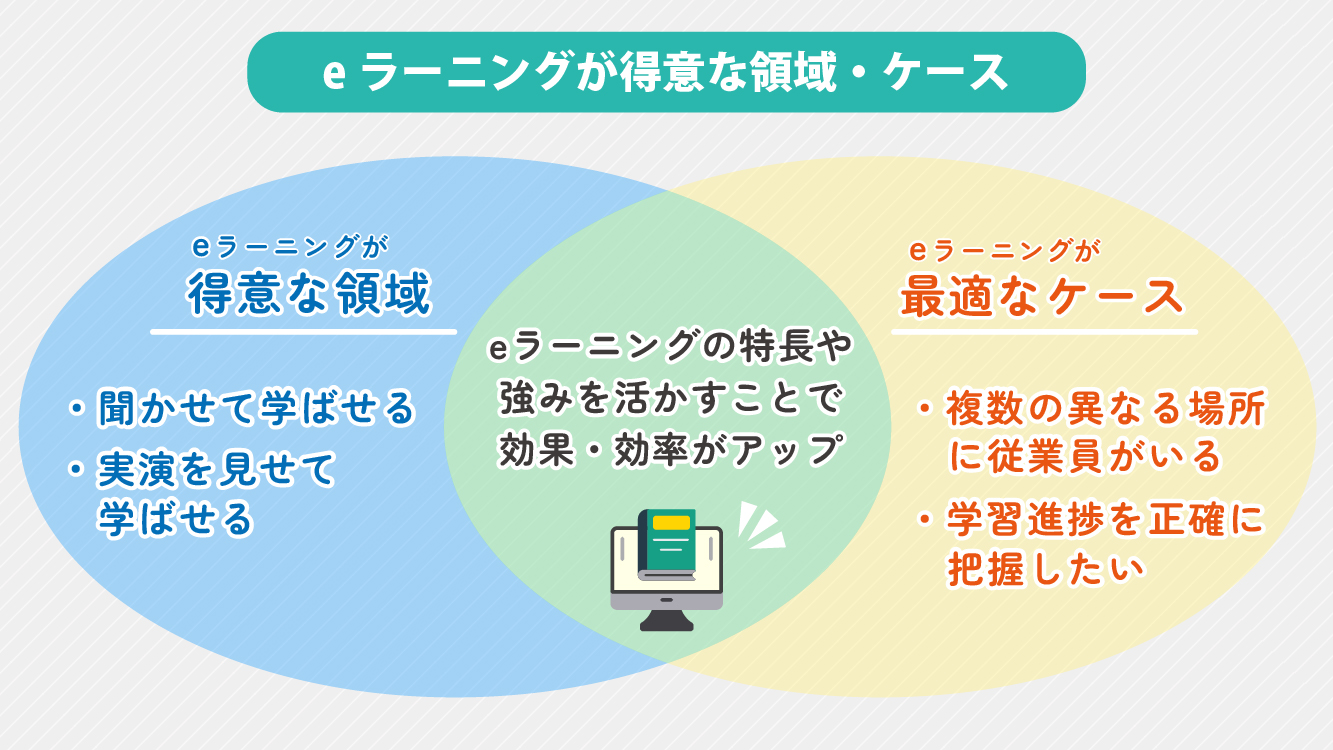
When incorporating e-learning into training, it is important to understand the most effective scenarios to maximize its benefits. Here, we will explain in detail the areas where e-learning excels and the cases suitable for its implementation.
Areas of Expertise in e-Learning
1. Teaching by Listening
E-learning is suitable for training that conveys information using audio and video. By listening to the instructor’s explanations and understanding complex processes through illustrated diagrams, it stimulates both auditory and visual senses simultaneously, promoting comprehension and retention.
2. Show Demonstrations to Teach
It is also suitable for training that demonstrates certain actions or procedures. For example, recording model movements by senior employees or instructors and watching them allows for concrete learning. Furthermore, by utilizing videos and animations, it is possible to convey practical content more clearly.
On the other hand, e-learning faces challenges with learning methods that require the following approaches.
・Learning that involves discussions and idea exchanges among participants
・Learning that hones practical skills through hands-on experience
・Learning that deepens understanding through sharing with others and asking questions
When incorporating these, it is advisable not to rely solely on e-learning but to consider hybrid training methods. For example, after previewing the overview and prerequisite knowledge through e-learning, opportunities for online discussions can be provided, group work can be combined, and post-course tests can be conducted again via e-learning.
e-Learning is the Optimal Case
1. Cases Where Employees Work in Multiple Locations, Such as Remote Work
In today's world where remote work is widespread, it is common for employees to work from different locations. With e-learning, consistent training content can be provided regardless of location, overcoming geographical and physical constraints.
2. Cases Where You Want to Accurately Grasp Learning Progress
With e-learning, you can accurately track each individual's learning progress and level of understanding through the system. This helps prevent missed participation and delays in learning, allowing you to firmly confirm the effectiveness of the training.
By leveraging the features and strengths of e-learning, it serves as an effective and efficient tool for in-house training.
5. Examples of Training Where e-Learning is Optimal

In the previous chapter, we explained the areas where e-learning excels and the cases suitable for its use. Here, we will go further and introduce specific examples of training where e-learning is particularly effective. Please view them while imagining in what situations they can be utilized depending on the training themes and target audience.
〈Company-wide Training〉
Examples: Compliance Training, Basic Information Security Education, Harassment Training, Mental Health Training
E-learning is ideal for content that all employees need to understand uniformly, such as legal compliance and internal rule awareness. It allows for standardized training across the entire company and makes it easy to record and manage course completion histories, which can also be used to prove training implementation and support audit responses.
〈New Employee Training〉
Example: Microsoft Office Training, Business Etiquette Training
Learning content that requires repeated study, such as basic job skills and professional manners, is perfectly suited for e-learning. Since learners can study at their own pace according to their progress, it is also advantageous for ensuring knowledge retention.
〈Customer Service and Product Training〉
Examples: Sharing new product information, customer service manners, sales talk training, etc.
For companies with multiple stores or organizations with many sales locations, e-learning is an effective way to quickly deliver information to all employees. By incorporating videos and scenario-based presentations, learners can acquire more practical knowledge while imagining actual on-site situations.
〈Tests for Group Training and Practical Training〉
By complementing face-to-face training and practical instruction with tests and review content using e-learning, it leads to better retention of the learning material. It is also suitable for follow-up and retesting after the course, and helps visualize the effectiveness of the training.
The strength of e-learning lies in its ability to deliver the same content to many people at once with consistent quality. When skillfully utilized according to the theme and target audience, it can be expected to improve learning effectiveness and efficiency.
6. Key Success Points for Incorporating e-Learning into In-House Training

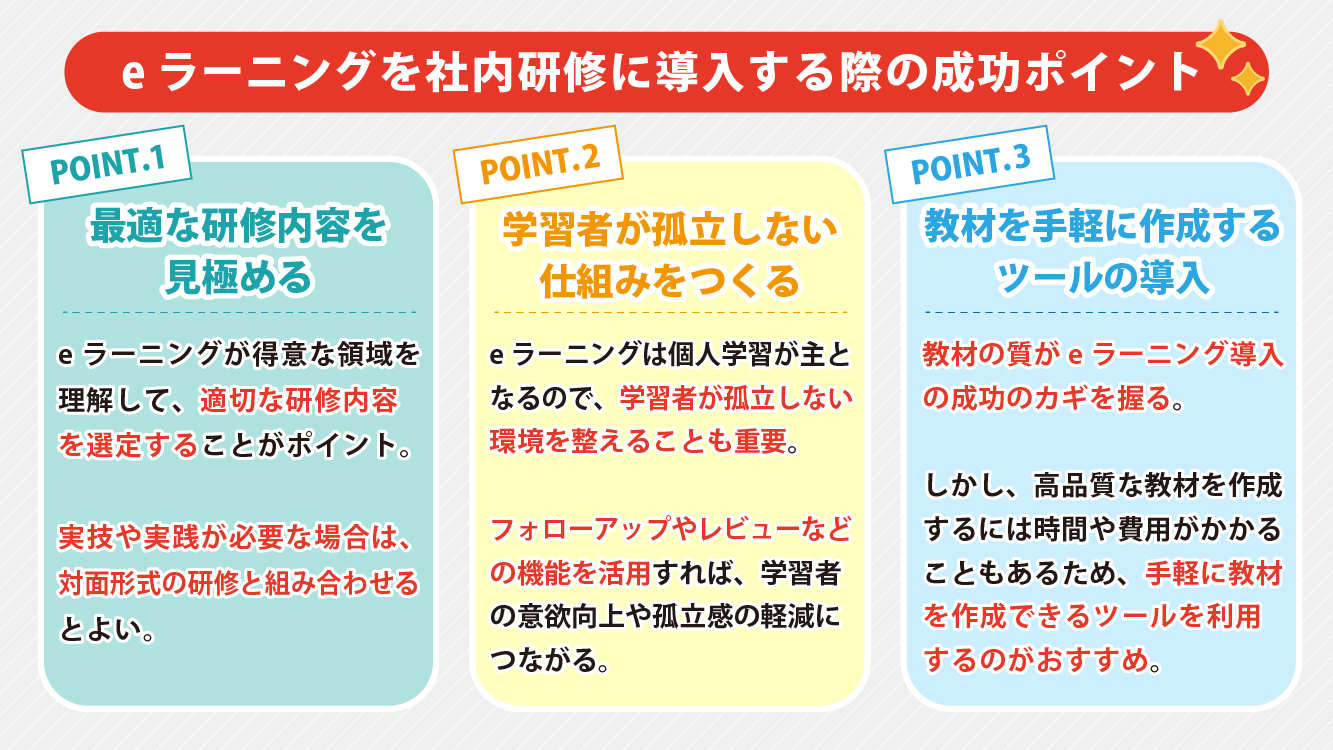
Here, we specifically explain the key points for successfully incorporating e-learning into in-house training.
〈Point 1〉Identify the Optimal Training Content
Understanding the areas where e-learning excels and selecting appropriate training content is the first step toward success. As mentioned earlier, e-learning is ideal for training that involves learning theories and knowledge, but when practical skills or hands-on experience are required, consider combining it with face-to-face training. For example, in customer service or sales skills training, it is recommended to first learn the basic knowledge through e-learning, followed by role-playing and practical instruction in a “hybrid format.”
〈Point.2〉Promote motivation and create a system where learners do not feel isolated
Since e-learning mainly involves individual study, it is important to create an environment where learners do not feel isolated. By introducing a system equipped with the following features, it is possible to maintain motivation while also improving educational effectiveness.
■ Follow-up Function: Supports learners with progress management and reminders
■ Automatic Grading Function: Allows immediate confirmation of learning comprehension
■ Review Function: Updates and improves the quality of materials through a system that receives feedback from learners
■ Community Function: Provides a place where learners can communicate with each other
By utilizing these mechanisms, learners can continue their studies more easily, which leads to a reduction in feelings of isolation.
〈Point 3〉Introducing Tools for Easy Content Creation
It is no exaggeration to say that the success of implementing e-learning depends on the quality of the materials. However, creating high-quality materials can require significant time and cost. Therefore, we recommend utilizing tools that allow for easy content creation.
The following blog provides a detailed explanation about e-learning authoring tools.
>A Strong Ally for Creating E-learning Materials: "E-learning Authoring Tools"
By focusing on these points, it becomes easier to maximize the learning effectiveness of in-house training that has implemented e-learning.
7. Introduction to the Recommended Tool for Creating E-learning Materials: "iSpring Suite"
Here, we provide a brief explanation of "iSpring Suite," a representative e-learning authoring tool. If you are considering producing e-learning materials in-house, please consider this option.
What is iSpring Suite?
iSpring Suite is an "all-in-one toolkit" that allows you to easily create e-learning content. Even without specialized knowledge, it can be operated in a PowerPoint environment, making it easy for beginners to use.
Benefits of iSpring Suite
■Integration with PowerPoint
You can smoothly create original materials based on documents created in PowerPoint.
■Addition of Interactive Elements
You can easily incorporate interactive elements such as quizzes, videos, and simulations.
■Multi-Device Support
The created content can be viewed not only on PCs but also on smartphones and tablets. It also supports mobile distribution.
For those who want to know more details, please see this article about iSpring.
>E-learning Blog - iSpring | E-learning by Human Science
8. Summary

E-learning is a learning style that offers many benefits for companies, such as the convenience of being able to learn anytime and anywhere, cost reduction, and the ability to standardize the quality of training. To enhance the learning effectiveness of e-learning, preparing appropriate materials is key.
To create high-quality teaching materials, we recommend utilizing e-learning creation tools like iSpring Suite. Human Science, a certified reseller of iSpring, provides extensive support for the introduction and operation of iSpring products, including iSpring Suite, as well as content creation services.
If you are considering "wanting to implement e-learning" or "wanting to know more about iSpring Suite," please feel free to contact us. We will fully support you in creating successful in-house training.
You can check the details of the services on the Human Science website.
>Create rich e-learning materials with the familiar PowerPoint you are used to
>iSpring product implementation / content creation support
Understand the Features and Usage of iSpring Suite / iSpring Suite AI!Comprehensive iSpring Guide

This section introduces the overview and usage of the animation teaching material production tool "iSpring."
This book provides a complete understanding of iSpring. You will also have an image of the teaching material production after implementation.
【Contents】
- What is iSpring Suite / iSpring Suite AI
- How to create teaching materials using iSpring Suite / iSpring Suite AI
- Overview and utilization of iSpring Suite AI
- Features of iSpring Suite AI
- Specific Usage of iSpring Suite AI
- iSpring Suite AI Certified Resellers
- Introduction to Human Science
Supervisor Information