







2025.07.10
2026.10.08
What is Totara Learn? Explanation of Features, Implementation Benefits, and Costs as a Corporate LMS

-
Category
Recommended Articles
-
What is Vyond? Introducing the benefits of an animation video production tool that can be used for business.
-
[Animation Teaching Material Production] How to Create e-Learning Materials ②
-
How does Vyond differ from other animation production software? Comparison and recommendations
-
Can Vyond animations be used as teaching materials? Here are the benefits of using them in e-learning and training.
-
Let's create business animations with Vyond! An explanation of the reasons and benefits recommended for business, as well as challenges.
-
Vyond Go (AI Video Generation) Tips and Best Practices ① Vyond Go Setup Guidelines
-
Moodle Basic Course: What is Moodle?
-
[Moodle Basic Course] What can the e-learning management system Moodle do?
-
[Moodle Basic Course] What can be done with Moodle's default features
-
Benefits and Considerations of Moodle Cloud Services
-
Moodle is not only used by universities (widespread use)



Totara Learn has been attracting attention as a means to streamline corporate talent development and skill management. Many people may be researching "What is Totara?", "How is it different from Moodle?", and "Where should I consult?"
Human Science Co., Ltd. is the only official Totara partner in Japan, providing one-stop services from implementation support to operation and customization.
In this article,
・What Totara Learn is
・Features and strengths as a corporate LMS
・Differences from Moodle
・Implementation process and costs
・Frequently Asked Questions (FAQ)
will be explained comprehensively.
Table of Contents
1. What is Totara Learn?
2. Reasons Why Totara Learn is Chosen as a Corporate LMS
3. Differences Between Moodle and Totara Learn [Comparison Table]
4. Totara Learn Implementation Process (For Corporations)
5. About Totara Learn Costs
6. Frequently Asked Questions (FAQ) About Totara Learn
7. Summary|Totara Learn as an "Enterprise Growth Foundation" LMS
1. What is Totara Learn?
Totara Learn is an open-source learning management system (LMS) designed for companies and organizations.
It is used by major companies, government agencies, and non-profit organizations worldwide, with particular strengths in talent development, skill management, and education based on organizational hierarchy. Although developed based on Moodle, its major feature is that it comes standard with functions necessary for corporate talent development.
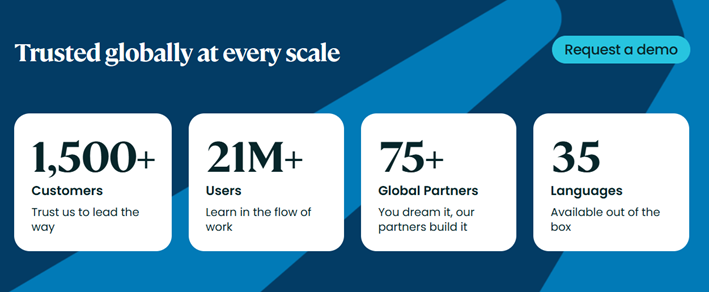
*From the official Totara website (https://www.totara.com/) (As of April 2026)
2. Reasons why Totara Learn is chosen as an LMS for businesses
Totara Learn is designed not just as a simple e-learning delivery tool but with the purpose of "operating talent development across the entire organization as a system."
Organizational Hierarchy and Position Management
You can represent the actual organizational structure such as departments, roles, and titles within the system.
This enables automatic assignment of training according to roles.
Dynamic Audience
Users who meet certain conditions (such as department, position, or work location) can be automatically grouped.
Even with transfers or promotions, appropriate learning is automatically reassigned.
Competency Management
Define the skills required for each job type and role, and visualize "who currently lacks which skills."
Report and Analysis Functions
You can grasp the learning status by organization, position, and team units, and utilize it to improve human resource development measures.
3. Differences Between Moodle and Totara Learn [Comparison Table]
Many people considering Totara also include the open-source Moodle as an option. We have summarized the differences between Totara and Moodle in a comparison table.
| Comparison Items | Totara Learn | Moodle |
|---|---|---|
| Main Uses | Corporate and Organizational Talent Development | Educational Institutions and General-purpose LMS |
| Organizational Hierarchy Management | Standard Feature | Additional Development Required |
| Competency Management | Standard Feature | Standard Feature + Plugin |
| HR Integration and Role-based Training | Strong Point | Requires Design |
| Flexible Customization | Possible | Possible |
| Intended Users | Corporations and Government Agencies | Primarily Schools and Universities |
If the goal is corporate talent development and skill management, Totara Learn is suitable; for educational institutions or general-purpose LMS, Moodle is appropriate.
>Reference Blog: 【Moodle Basic Course】What is Moodle? | e-Learning Blog
>Reference Blog: What is an Open Source LMS? Advantages and Disadvantages, Introducing the Latest Open Source LMS | e-Learning Blog
4. Totara Learn Implementation Process (For Companies)
Implementing Totara Learn is not just about installing the system; it is important to proceed after organizing "what kind of talent you want to develop and how." Especially for corporate LMS, the design that considers organizational structure, operational framework, and future scalability will determine the success after implementation.
Here, we introduce the general process for companies to implement Totara Learn, divided into steps from consideration to the start of operation.
(1) Hearing and Requirements Definition
Organize Educational Objectives, Organizational Structure, and Issues
The first step in implementation is to clarify "why Totara Learn is being introduced." Proceeding with this unclear often leads to an "unused LMS" after operation begins.
Mainly, the following points are organized.
・Confirmation of educational objectives
Examples: New employee training, hierarchical training, visualization of specialized skills, compliance education, etc.
・Target Audience and Organizational Structure
Information such as departments, positions, job titles, and employment types that are reflected in Totara's organizational hierarchy and position management
・Current Issues
・Training is dependent on individual staff
・Progress and course completion status are not being tracked
・Training does not keep up with transfers and promotions
・Relationship with Existing Systems
Whether to integrate with HR systems and authentication infrastructure
At this stage, it is important to draw up a "blueprint for how to use Totara."
(2) Design and Construction
Selection of Cloud/On-Premises and Initial Setup
Once the requirements are finalized, system design will be carried out based on them.
・Selection of Delivery Method
・Cloud (when you want to reduce operational burden)
・On-Premises (when security and control are prioritized)
・Basic Configuration Design
・Organizational Hierarchy and Position Structure
・Roles (Administrator / Supervisor / General User)
・Permissions and Viewing Scope
・Preparation of Totara-specific features
・Design of dynamic audience conditions
・Creation of competency and learning plan frameworks
・Initial Setup
・Optimization of Japanese display
・Adjustment of report items, etc.
At this stage, the key point is designing with a focus on making it easy to operate on-site.
(3) Data Migration and Testing
User and Course Registration, Operation Verification
The designed content is reflected in the actual environment and verified under the same conditions as production.
・User Data Registration
・Bulk Registration via CSV or HR System Integration
・Reflection of Department and Position Information
・Course Material and Course Registration
・Existing e-Learning Materials, Videos, PDFs, etc.
・Setting Learning Plans and Enrollment Conditions
・Scenario Test
・Whether courses are automatically assigned upon transfer or promotion
・Operation checks for administrators, supervisors, and general users respectively
・Load and Stability Verification
・Simultaneous Access
・Report Output
By carefully conducting this testing phase, you can greatly reduce troubles after the start of operation.
(4) Start of Operation and Support
Training for Administrators and Users, Operational Support
If there are no issues, we will transition to live operation. At the same time, we provide support to ensure the LMS continues to be actively used.
・Training for Administrators
・How to manage users, create reports, and operate basic settings
・Support for Users
・Explanation of how to take courses
・Preparation of operation manuals and FAQs
・Operational Support
・Inquiry Response
・Regular Operational Consultations
・Version Upgrade Support
・Improvement and Expansion
・Improvement of initiatives based on learning data
・Expansion to new educational initiatives
Including all of this, Totara Learn is utilized not as a "one-time implementation" but as a growing LMS.
5. About the Costs of Totara Learn
Totara Learn is a subscription-based (annual) LMS for enterprises. It is not a "one-time software purchase" but a pricing structure premised on continuous use and improvement.
Therefore, the costs are broadly divided into three categories:
① Costs for usage
② Costs incurred at the time of implementation
③ Costs for ongoing operation
.
5-1. Subscription Fees
Annual Usage Fee Based on Number of Users
The subscription fee for Totara Learn is primarily determined based on the number of active users.
・Annual contract (1-year term)
・Based on the number of users who actually log in and learn
・Adjustable according to expansion or reduction in usage scale
5-2. Implementation Costs
Costs from Requirements Definition to Initial Setup
Totara Learn offers high flexibility, making it important to design according to each organization's objectives. Therefore, the following tasks incur costs during implementation:
・Hearings and requirements definition
・Organizing educational objectives, organizational structure, and operational methods
・System design and construction
・Organizational hierarchy and position design
・Permissions and role settings
・Initial configuration and environment setup
・Cloud/on-premises environment setup
・Basic settings and display adjustments
・Data migration support
・Migration of user information and existing materials
Implementation costs vary greatly depending on requirements such as "how extensively to develop" and "whether there is integration with existing systems."
5-3. Operating Costs
Costs to stabilize operations and expand utilization
Even after starting operations, a certain amount of operating costs will be incurred to continuously leverage Totara Learn.
・Maintenance and Support
・Handling inquiries related to operation and settings
・Support during failures and troubles
・Version upgrade support
・Operation Outsourcing
・User and Course Management
・Report Creation Support
・Secretariat Work Outsourcing
・Additional Development and Improvements
・Custom Report Creation
・Integration with Other Systems
・Feature Expansion and UI Adjustments
Flexible options are also available according to the phase, such as "starting with in-house management and later utilizing external support."
Reasons why costs are individually estimated
The cost of Totara Learn varies depending on the following factors.
・Number of users and future expansion plans
・Complexity of organizational structure
・Required features and scope of customization
・In-house operation or external support
Therefore, instead of presenting a uniform price list, we provide individual estimates tailored to your objectives, scale, and operational policies.
6. Frequently Asked Questions (FAQ) about Totara Learn
- QWhat is Totara Learn?
- Totara Learn is a learning management system (LMS) specialized in corporate and organizational talent development. It is developed based on the globally used open-source LMS "Moodle," with enhanced learning management and skill management features tailored for businesses. It is suitable for companies that want to systematically operate talent development as a framework, from new employee training to hierarchical education and specialized skill development.
- QWhat is the difference from Moodle?
- While Moodle is a general-purpose LMS that supports a wide range of uses including educational institutions, Totara Learn is an LMS designed with corporate talent development and organizational management in mind.
In Totara Learn,
・Organizational hierarchy and position management
・Competency (skill) management
・Automatic assignment of learning based on transfers and promotions
These corporate-oriented features are standard, allowing you to build a practical talent development system without additional development.
- QIs it possible to implement in small-scale companies?
- Yes, it is possible. Totara Learn can be flexibly configured according to the number of users and the size of the organization, so there are cases where usage starts gradually from companies with only a few dozen employees. It is also easy to accommodate future increases in personnel and organizational expansion, making it possible to "start by implementing in some departments first and then gradually roll out company-wide."
- QIs customization possible?
- Yes, it is possible. Totara Learn is based on open source, allowing flexible customization to suit your business and operational rules.
For example,
・Creating custom reports
・Integration with existing systems (such as HR and authentication infrastructure)
・Adjustments to the UI and wording
and other adjustments tailored to each company's requirements are possible. It is common to leverage standard features while customizing only the necessary parts.
- QIs Japanese language support available?
- Yes, it is available. Human Science Co., Ltd. is the only official Totara partner in Japan, providing implementation support and operational assistance in Japanese.
Not just simple system support,
・Consultation on human resource development design
・Support aimed at operational adoption
・Continuous improvement proposals
are also included, which is a distinctive feature.
7. Summary|Totara Learn as an LMS that Becomes the "Foundation for Corporate Growth"
Totara Learn enables:
・Learning management based on organizational hierarchy
・Visualization of skills and competencies
・Automated talent development
and can be described as a complete LMS for enterprises.
Human Science Co., Ltd. is the only official Totara partner in Japan and provides hands-on support from implementation through operation.
If you are considering introducing Totara, please feel free to contact us first.
Supervisor Information