







2025.02.28
Comparing iSpring Suite and iSpring Suite AI! Explanation of Differences and Recommended Users

-
Category
Recommended Articles
-
What is Vyond? Introducing the benefits of an animation video production tool that can be used for business.
-
[Animation Teaching Material Production] How to Create e-Learning Materials ②
-
How does Vyond differ from other animation production software? Comparison and recommendations
-
Can Vyond animations be used as teaching materials? Here are the benefits of using them in e-learning and training.
-
Let's create business animations with Vyond! An explanation of the reasons and benefits recommended for business, as well as challenges.
-
Vyond Go (AI Video Generation) Tips and Best Practices ① Vyond Go Setup Guidelines
-
Moodle Basic Course: What is Moodle?
-
[Moodle Basic Course] What can the e-learning management system Moodle do?
-
[Moodle Basic Course] What can be done with Moodle's default features
-
Benefits and Considerations of Moodle Cloud Services
-
Moodle is not only used by universities (widespread use)



Both iSpring Suite and iSpring Suite AI are all-in-one toolsets that help create e-learning materials. While they have similar functions, there are differences in detailed features and support systems, making it important to choose according to your needs.
In this blog, we will compare their functions, cost differences, and recommended users in detail. We hope this will be helpful for your implementation.
1. A strong ally in material creation, iSpring product series

iSpring Suite and iSpring Suite AI are part of the iSpring product series offered by the American software company iSpring.
With iSpring Suite, you can easily create high-quality e-learning materials without the need for specialized programming or design knowledge. Since it utilizes the familiar PowerPoint, it is user-friendly even for beginners.
iSpring Suite AI is a high-functionality version based on iSpring Suite, with added features for cloud collaboration and content management. By using iSpring Suite AI, you can save materials on the cloud and perform real-time editing and feedback with team members.
For detailed explanations, please check the following from our past blog.
>What is iSpring Suite? Features, Pricing, and Benefits of Implementation
>What are the Features of iSpring Suite? - Introduction to Advantages, Disadvantages, and Use Cases!
2. Comparison of iSpring Suite and iSpring Suite AI
iSpring Suite and iSpring Suite AI are used by many companies, but when considering implementation, many people may wonder about the differences between them. Therefore, we have summarized the functional and price differences between iSpring Suite and iSpring Suite AI in an easy-to-understand comparison table.
●Functional Aspects
This table compares the main features of iSpring Suite and iSpring Suite AI.
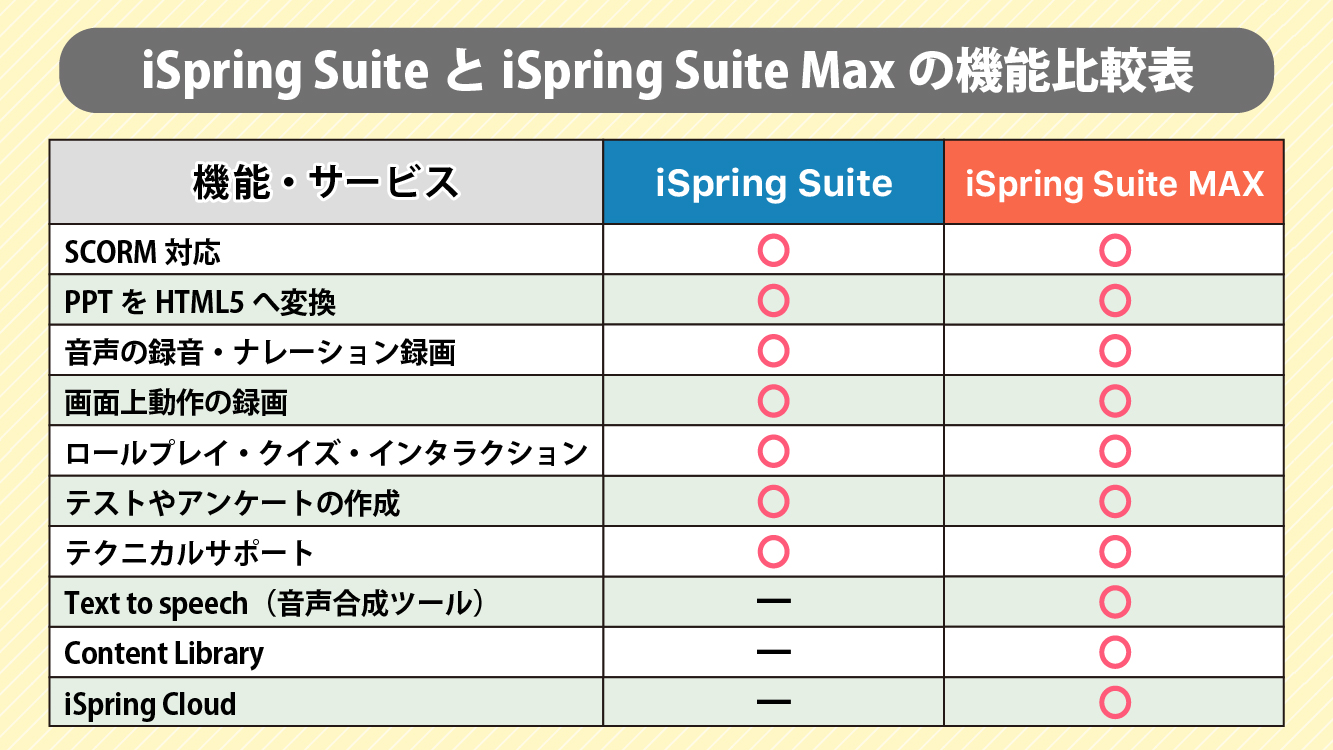
iSpring Suite covers the basic functions for creating e-learning materials in a PowerPoint environment, including adding interactive elements such as videos and quizzes, recording audio and narration, and converting to HTML or MP4.
On the other hand, iSpring Suite AI includes all the features of iSpring Suite plus additional functions useful for collaborative work, such as cloud-based management and co-editing. It also allows you to use over 90,000 templates and characters, and easily create custom characters using the "Character Builder."
〈Main Features Added to iSpring Suite AI〉
iSpring Cloud
・A cloud service that allows you to share, distribute, and manage created educational materials and courses online.
Text to speech
・A text-to-speech tool that can generate natural narration from text
Content Library
・Over 90,000 materials are available, including templates and images that can be used in the library
・Custom character creation and editing are also possible
●Pricing
If you purchase one license for one year, iSpring Suite costs about $770, and iSpring Suite AI costs about $970, a difference of $200. However, considering the functionality and convenience of iSpring Suite AI introduced above, by adding just $200, you can create higher-quality educational materials and use it flexibly within a team.
Overall, it can be said that iSpring Suite AI offers better cost performance.
3. Recommended Users of iSpring Suite and iSpring Suite AI
So far, we have discussed the differences in features and pricing between iSpring Suite and iSpring Suite AI. In this chapter, we will explain who each is recommended for.

●Recommended Users of iSpring Suite

(1) Limited features of other tools being used/wanted
iSpring Suite has basic educational material creation features, so if you are using a separate material or supplementing some functions, such as a speech synthesis tool, having iSpring Suite may be sufficient. If the desired features are limited, iSpring Suite may offer better cost performance.
(2) Collaborating as a team with limited desired features
Even if collaboration as a team is necessary, if frequent updates to materials are not required or simultaneous editing features in the cloud are not needed, the features of iSpring Suite can be utilized sufficiently.
(3) Narration is often recorded with a human voice
You can create educational materials using iSpring Suite by recording audio with devices like a microphone or by importing pre-recorded narration materials. If you do not use the speech synthesis feature, iSpring Suite should perform adequately.
(4) Having separately prepared materials such as illustrations
If you have separately prepared materials such as illustrations, the need for a material library is not high, so it may not be necessary to choose iSpring Suite AI with additional costs.
●Recommended Users of iSpring Suite AI
(1) Want to narrow down the tools used
iSpring Suite AI has many functions necessary for creating educational materials, allowing you to consistently handle everything from creation to sharing and collaboration without relying on other external tools. This eliminates the hassle of switching between or juggling multiple tools, improving production efficiency.
(2) Production staff take on multiple roles
iSpring Suite AI is equipped with a wide range of features such as design, text writing, audio recording and editing, and character creation, making it highly useful in situations where production staff handle multiple roles simultaneously.
(3) Want to use the speech synthesis feature
iSpring Suite AI allows you to convert text into natural-sounding speech simply by adding text and selecting the language and voice type. This feature is especially useful for efficiently adding audio when time or resources for recording narration are limited.
(4) Need for Illustrations and Other Materials
One of the attractions of iSpring Suite AI is the ability to freely use a rich library of illustration materials, such as characters and backgrounds. Without preparing materials separately, you can immediately utilize a wide variety of graphics, enabling smooth creation of high-quality teaching materials.
As such, iSpring Suite is suitable for individual users or small teams who want to efficiently create teaching materials with simple functions. On the other hand, iSpring Suite AI supports cloud-based collaborative editing, making it ideal for medium to large teams that want to utilize more advanced features among staff. Of course, it is also recommended for cases where production needs to be completed with limited resources.
When choosing between the two, it is important to consider not only their functionalities and prices but also the size of the team and the necessity of content management.
4. Summary

Both iSpring Suite and iSpring Suite AI are excellent e-learning content creation tools, but the type you should choose varies depending on your purpose and needs.
If you are unsure about your selection, please feel free to consult Human Science, an iSpring certified reseller. Based on our experience and know-how from selling and proposing iSpring products to numerous customers, our knowledgeable staff will assist you in making the best choice.
In addition to product purchases and implementation support, we also provide a wide range of support, including the creation of teaching materials after purchase, technical support, and hosting usage seminars, so even those creating e-learning materials for the first time can feel confident in entrusting us with their needs.
You can check the details of our services on the Human Science e-learning site.
>iSpring Implementation Support
>iSpring Product Implementation/Creation Support
Understand the Features and Usage of iSpring Suite / iSpring Suite AI!Comprehensive iSpring Guide
This section introduces the overview and usage of the animation teaching material production tool "iSpring."
This book provides a complete understanding of iSpring. You will also have an image of the teaching material production after implementation.
【Contents】
- What is iSpring Suite / iSpring Suite AI
- How to create teaching materials using iSpring Suite / iSpring Suite AI
- Overview and utilization of iSpring Suite AI
- Features of iSpring Suite AI
- Specific Usage of iSpring Suite AI
- iSpring Suite AI Certified Resellers
- Introduction to Human Science
Supervisor Information