







2026.02.16
Tried Using Moodle AI! | Thorough Explanation of Latest Features, Implementation Methods, and Noteworthy Plugins

-
Category
Recommended Articles
-
[Moodle Manual ③] 2025 Edition | Support Staff Explain How to Set Up and Utilize Forums!
-
[Moodle Manual ②] 2025 Edition|How to Create Quizzes, Setup Procedures, and FAQ Explained by Support Staff!
-
[Moodle Manual ①] 2025 Edition|How to Set Assignments & Tips for Use Explained by Support Staff!
-
What is Vyond? Introducing the benefits of an animation video production tool that can be used for business.
-
[Animation Teaching Material Production] How to Create e-Learning Materials ②
-
How does Vyond differ from other animation production software? Comparison and recommendations
-
Can Vyond animations be used as teaching materials? Here are the benefits of using them in e-learning and training.
-
Let's create business animations with Vyond! An explanation of the reasons and benefits recommended for business, as well as challenges.
-
Vyond Go (AI Video Generation) Tips and Best Practices ① Vyond Go Setup Guidelines
-
Moodle Basic Course: What is Moodle?
-
[Moodle Basic Course] What can the e-learning management system Moodle do?
-
[Moodle Basic Course] What can be done with Moodle's default features
-
Benefits and Considerations of Moodle Cloud Services
-
Moodle is not only used by universities (widespread use)



As the use of AI (artificial intelligence) rapidly expands in educational settings, the LMS "Moodle," used worldwide, is also accelerating the implementation of AI features. This article explains the latest Moodle AI features, the introduction process, points to note in actual operation, and noteworthy AI plugins—information that Moodle administrators should be aware of.
Table of Contents
- 1. Latest Features and Characteristics of Moodle AI 1-1. Standard AI Features Available from Moodle 4.5 Onwards
- 2. How to Introduce Moodle AI | From Obtaining API Keys to Configuration
- 3. Points to Note When Introducing Moodle AI
- 4. Future Prospects of Moodle AI | From the Official Moodle Column
- 5. Introduction to the Latest Moodle AI Plugins 5-1. OpenAI ChatBlock (Chatbot)
- 6. Summary|Utilizing Moodle AI with a Human-Centered Approach
5-2. Generative AI Question Bank (Automatic Question Generation)
1. Latest Features and Characteristics of Moodle AI
In recent years, the use of AI (artificial intelligence) in educational settings has rapidly expanded, bringing significant transformations to the field of Learning Management Systems (LMS). The open-source LMS "Moodle," used worldwide, is no exception, with the implementation of AI features becoming full-scale in the latest versions.
1-1. Standard AI Features Available from Moodle 4.5 Onwards
From Moodle 4.5 onwards, API integration with major AI services such as OpenAI, Google Gemini, and Azure OpenAI has become possible. This allows users to utilize AI functions directly within Moodle without opening an external browser, improving convenience in educational settings. The main AI features available up to the latest version 5.0 are as follows.
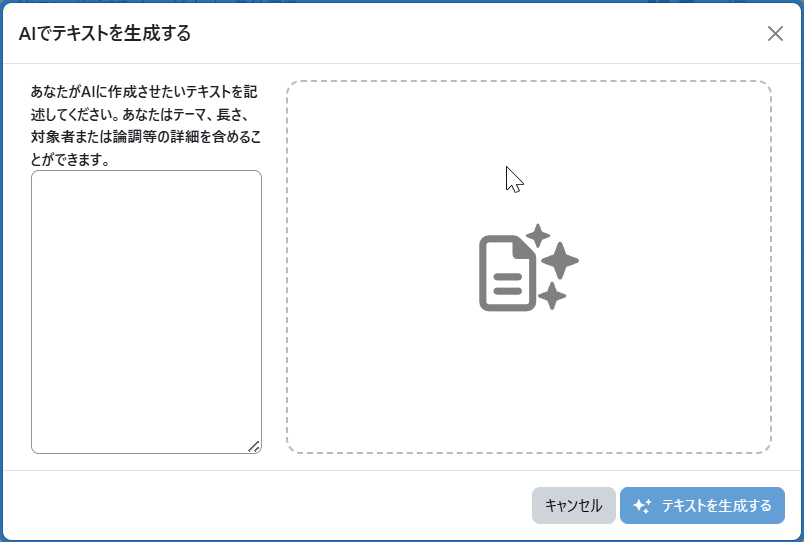
(1) AI-powered Content Generation (from Moodle 4.5)
An AI menu has been added to the text editor, allowing you to generate text and images based on the input instructions. This can be used when creating course summaries, page content, course images, and more.
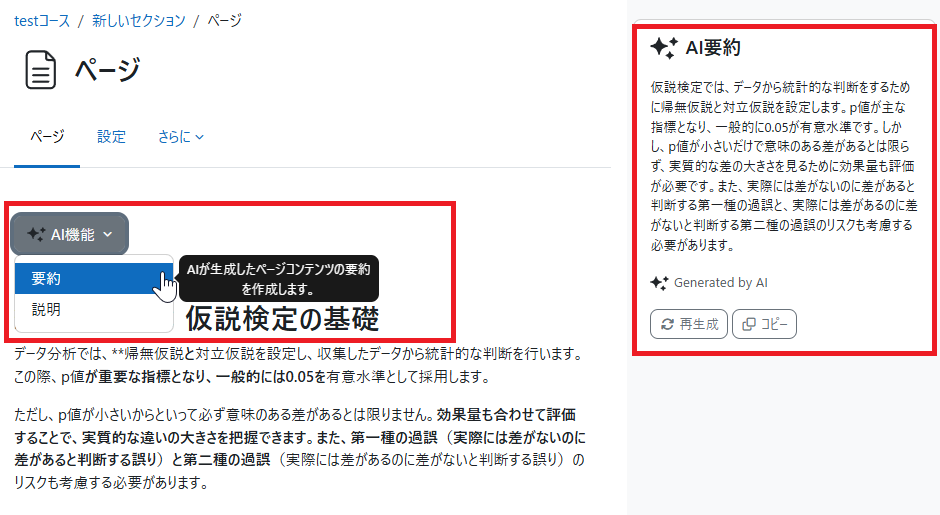
(2) Page Summarization Feature (moodle4.5~)
The summarization feature allows AI to summarize the information within a page. For example, when using the AI summarization function on long texts created with the Book or Page modules, it enables visitors to quickly grasp the content of the page through a concise summary.
(3) Page Explanation Feature (from moodle 5.0)
The explanation feature allows AI to provide supplementary explanations about the content within the page. For example, when using AI explanation on a page that lists the main events of the Kamakura period in bullet points, the AI will add supplementary information while giving a detailed explanation about the Kamakura period.
Verification: How to Display the Intended Generated Results
When using AI explanations, some people may want the AI to output the intended generated results. In such cases, try clearly writing instructions for the AI somewhere on the page.
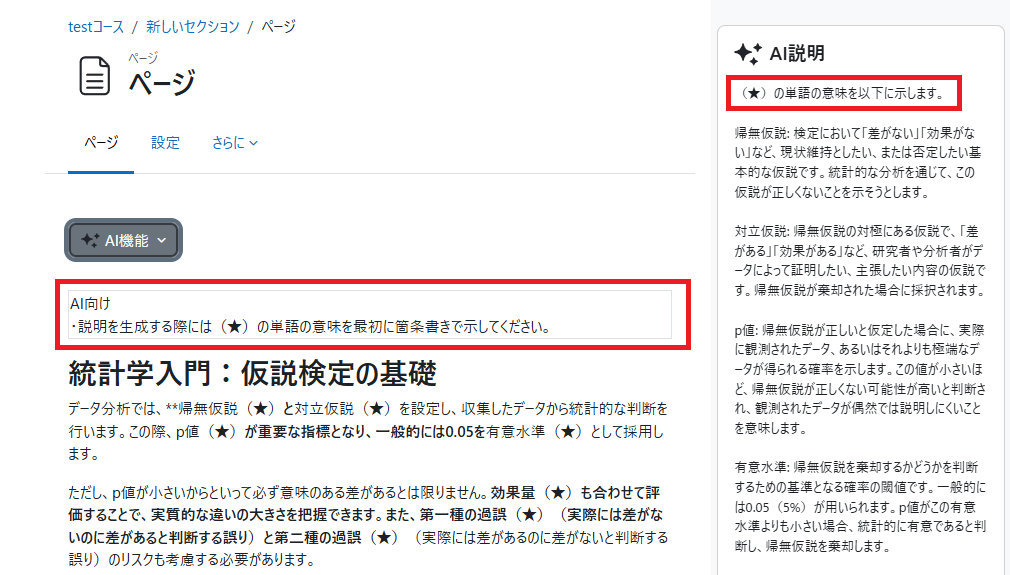
For example, imagine a situation where you want the meanings of words in the text on the page to be explained. As an instruction to the AI, I inserted the text "When explaining, please list the meanings of the (★) words first in bullet points" at the beginning of the text, and the AI explanation output the meanings of the words in bullet points.
2. How to Introduce Moodle AI | From Obtaining API Keys to Configuration
To use the AI features (AI subsystem) included in Moodle by default, Moodle 4.5 or later is required. Starting from version 4.5, functionality was added to integrate with AI providers such as OpenAI and Azure. In this article, using OpenAI as an example, we explain how to obtain an API key and the setup steps on the Moodle side.
■ Step 1: Prepare an OpenAI Account and Issue an API Key
① Access the OpenAI API key issuance page (https://platform.openai.com/api-keys).
② Create an account (or log in with an existing account).
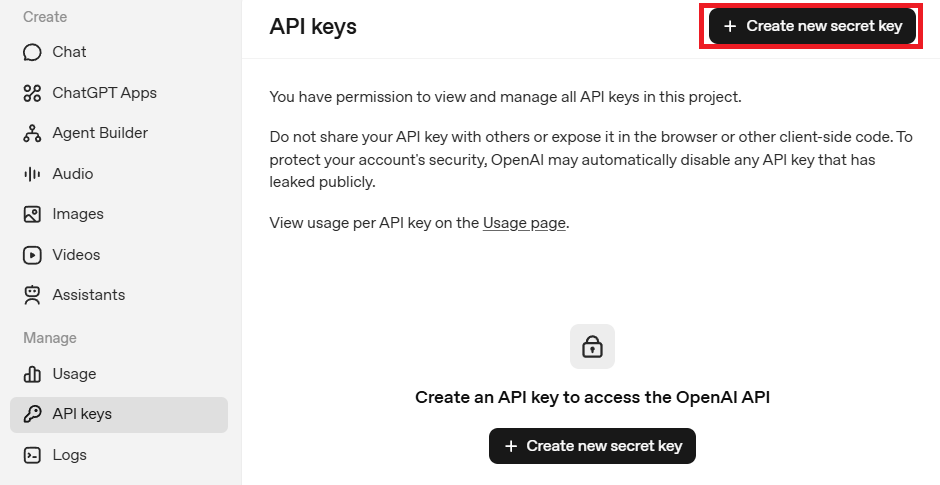
③ A screen like the one below will open. Click "Create new secret key" at the top right of the screen.
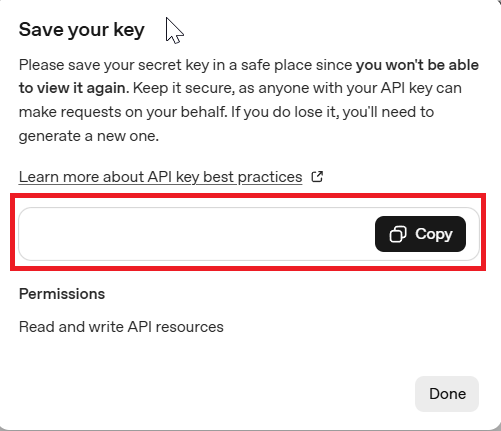
④Enter a name for the API key and click "Create secret key" to generate the secret key. This will be the API key required for configuration in Moodle, so please save it. *Since usage is paid, you will also need to register a payment method separately.
■ Step 2: Register the API Key in Moodle
① Log in to Moodle and click on "Site administration" > "General" > "AI providers".
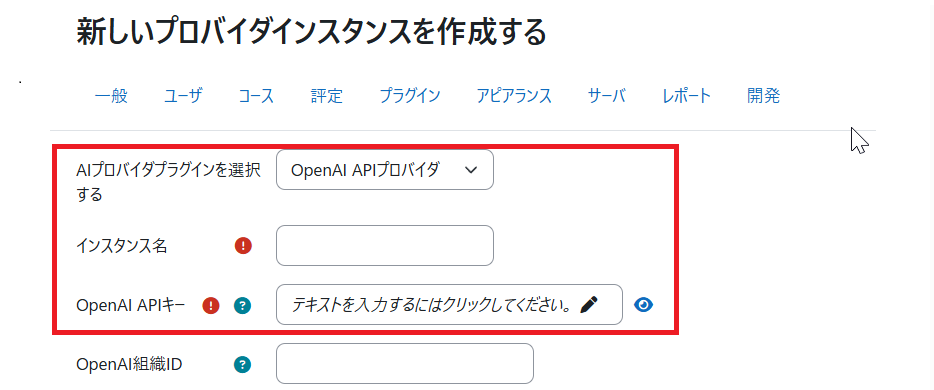
② Click "Create a new provider instance," then select the AI provider plugin as OpenAI, enter the instance name, and input the OpenAI API key you obtained earlier.
③You are now ready to use AI. Enable the settings and start using it.
3. Points to Note When Introducing Moodle AI
What points should you be careful about when introducing AI in Moodle? To prevent situations like "This wasn't supposed to happen!", please pay attention to the following points when implementing AI.
・Using AI incurs usage fees
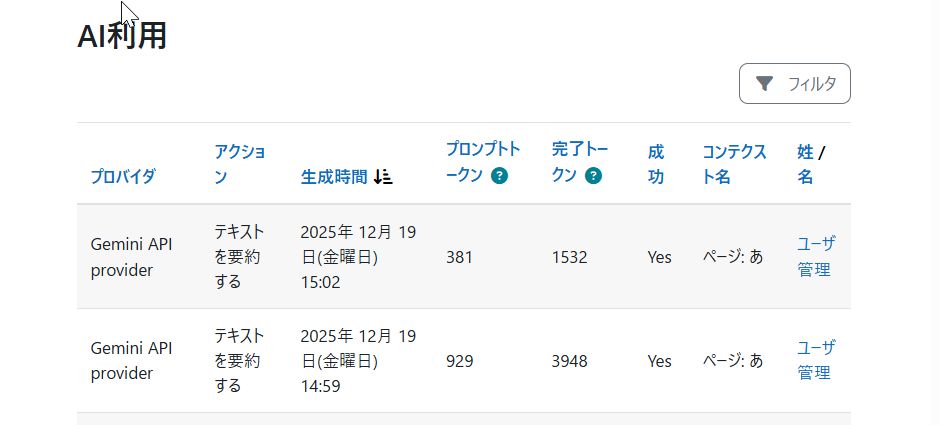
Moodle integrates with AI such as ChatGPT and Gemini using API keys. While AI usage is convenient, usage fees accumulate according to the processing performed. Each time you use features like text generation, page summarization, or AI explanations, API usage fees from OpenAI or Google Gemini are incurred. If you use these features without limits, the monthly API costs will naturally increase.
In Moodle 5.0, a management menu was added that visualizes API billing status. This allows administrators to grasp actual usage fees in real time and manage budgets accordingly.
Avoid meaningless implementation; first identify situations where AI can be effectively utilized and start with limited use.
・Ensuring Data Security and Privacy
While using AI is convenient, it also involves issues related to data security and privacy. Except for Ollama, the currently connectable AI providers operate by returning responses via the internet. The handling and security of data after transmission depend on the policies of the configured AI provider, so be sure to check the terms of use of the AI provider you will be integrating with before implementation. After confirming these, it is necessary to establish rules as an organization regarding which AI services to use and the extent to which their use is permitted.
・Quality Control of Generated Content
Content generated by AI is not always guaranteed to be accurate or reliable by its nature. Even when AI features are introduced in Moodle, users are required to understand the characteristics of AI and handle it appropriately rather than automatically trusting the generated results. In particular, the process of human verification of the validity of the generated content is indispensable, and it is necessary to inform users of its importance.
To facilitate smooth operation, it is desirable for site administrators to conduct empirical verification before use begins and to establish operational policies and verification procedures as an organization.
・Consider Differences in AI Literacy
Since AI is a new technology, there is a wide variation in users' proficiency levels. There is a possibility that educators who are familiar with AI and those who are just beginning to use it will achieve different results even when using the same functions. In particular, generative AI results are greatly influenced by the quality of prompts, so whether appropriate instructions can be given directly affects the effectiveness of its use.
If these differences in literacy are left unaddressed, disparities in AI utilization may widen within the organization. Therefore, it is important to implement training that shares the basics of AI usage and precautions, provide effective prompt examples and templates, and continuously share use cases and best practices when introducing AI. By establishing certain guidelines and support systems as an organization, it will be possible to mitigate skill gaps among users and promote more stable and equitable AI utilization.
4. Future Prospects of Moodle AI | From the Official Moodle Column
Many collaborators and users have been discussing the use of Moodle and AI, and future feature enhancements are being considered. The official Moodle column published on December 16, 2025, outlined the role of AI in Moodle LMS and its future direction.
Key Points of the Official Policy:
・Human-Centered Core Functions: Moodle does not rely on AI; its core functions are provided with a human-centered approach.
・Free Use of AI: The use of AI is unrestricted, allowing educators and organizations to choose as needed.
・Cautious Implementation: AI is an inevitable presence, but its introduction should be done carefully, respecting the realities on the ground.
・Strength of Open Source: Developers worldwide are creating new AI plugins and integration features.
・Flexible AI Utilization: AI can be utilized in ways that suit each situation, regardless of budget or environment.
>Field Notes: Where AI meets learning in Moodle LMS:
https://moodle.com/news/field-notes-where-ai-meets-learning-in-moodle-lms/
In other words, Moodle's approach to AI is not to place AI at the center of education, but rather to prioritize how users themselves engage in learning and then enable selective use of AI when necessary. The basic stance is not to have AI automatically create courses, grade, or handle communication with students as standard features, but to provide an environment where educators and organizations can use plugins or external services as they wish. This column reveals Moodle's attitude of leveraging the flexibility of open source to offer a system that allows AI to be utilized according to the users' goals and circumstances, rather than imposing uniform AI usage.
5. Introduction to the Latest Moodle AI Plugins
So far, we have looked at the AI features currently available as standard in Moodle and the future outlook, but there are also many AI-related plugins contributed by numerous collaborators from around the world in the Moodle plugin library. In particular, multiple plugins related to chatbots and automatic test question creation have been posted, showing that these are attracting attention from Moodle users.
Here, we will introduce AI-related plugins from the Moodle plugin directory that have a high number of downloads. *Please install the plugins introduced here at your own risk. Our company assumes no responsibility for any issues that may arise from their use.
5-1. OpenAI ChatBlock (Chatbot)
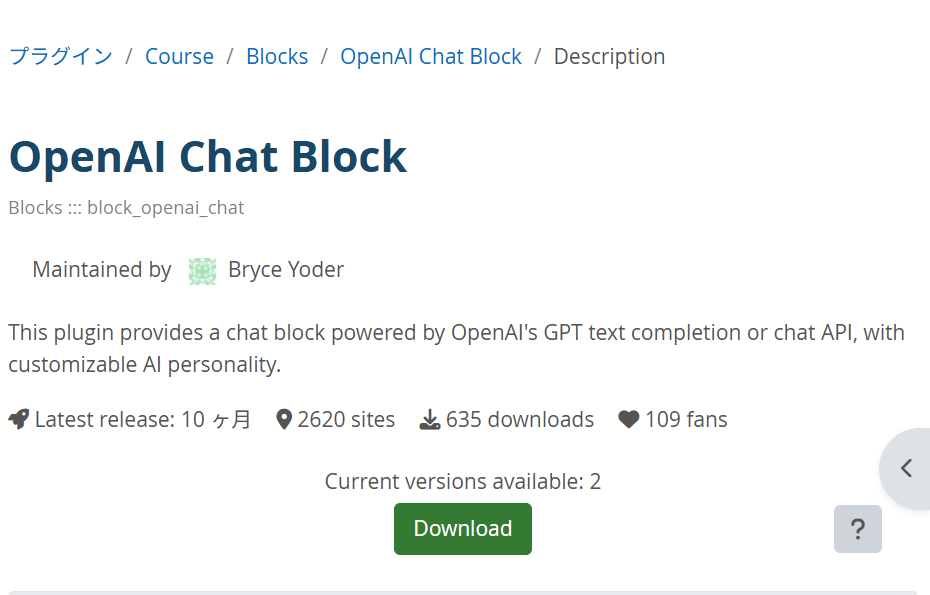
This is a plugin that allows you to install an AI chatbot within Moodle. It can be used by registering an OpenAI API key.
Download URL: https://moodle.org/plugins/block_openai_chat
▶Tried it out!
When you install it from the plugin list and configure it, an AI chat block will be displayed.
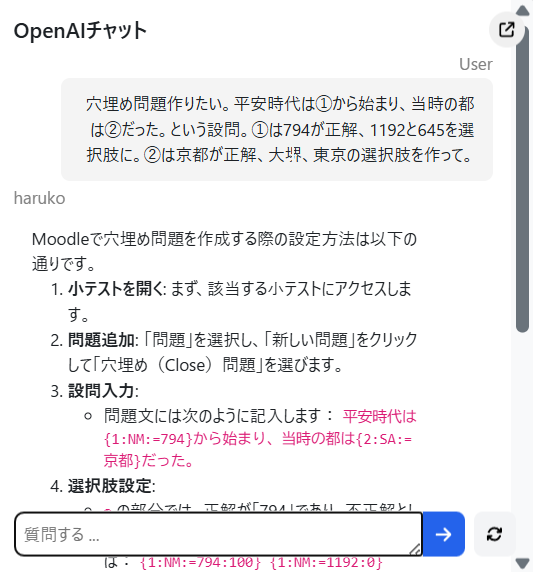
In this state, it’s basically just ChatGPT integrated into the Moodle screen. For example, if you say, "Tell me how to add an assignment," it won’t teach you how to operate Moodle. You need to say, "Tell me how to add an assignment in Moodle."
OpenAI ChatBlock allows you to register information in text format as "trusted information." For example, by pasting FAQs or manual texts, you can have it refer to those and provide answers.
Many staff members responsible for Moodle spend a lot of time answering questions about its operation, and some may feel it would be easier if a chatbot could automatically respond to frequently asked questions. For example, regarding fill-in-the-blank questions in quizzes, which can be difficult to configure, by setting the description method in the trusted information source, we were able to obtain responses like those shown in the image. Although some trial and error is necessary, it seems that it could be partially used as a chatbot for FAQs.
>Handling inquiries from teachers on their behalf! Human Science Help Desk Outsourcing Case:
5-2. Generative AI Question Bank (Automatic Question Generation)
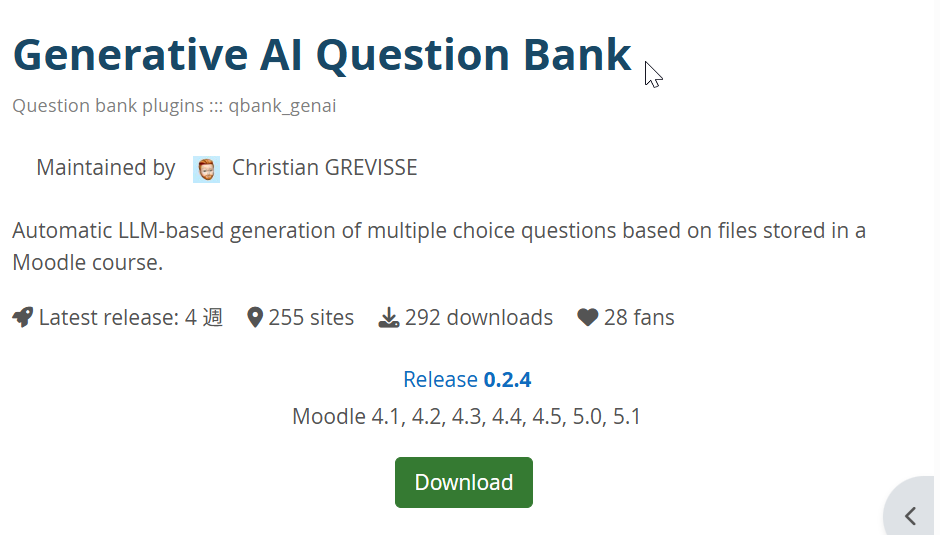
This can also be used by registering an OpenAI API key. It automatically generates questions in the question bank from PDFs and Word documents uploaded within the course.
Download URL: https://moodle.org/plugins/qbank_genai
▶Tried it out!
After installing from the plugin list and configuring it, a menu called "Generate Questions" will be added under "More" on the course page. Select the materials uploaded to the course, click the "Generate Questions" button, and wait.

A dedicated category was added, and 10 questions were generated. In the image below, you can see multiple-choice questions generated based on text materials about the Kamakura period, such as "How did the Kamakura period begin?" and "In what year was the Taira clan defeated?"

6. Summary|Utilizing Moodle AI with a Human-Centered Approach
Since Moodle 4.5, AI features have been gradually implemented, expanding their use in educational settings. However, Moodle's stance on AI is positioned as an "option" rather than a "requirement," and the decision to adopt it is left to each educational institution. The key to success is to introduce features gradually, starting with those expected to be effective, while thoroughly managing costs and security policies. Additionally, sharing best practices to improve users' AI literacy is indispensable.
Leveraging the flexibility of open source, Moodle allows the addition of functions tailored to each organization's needs through plugins. Going forward, under the policy of creating an environment where "users can utilize AI as needed," it is expected to evolve as a tool that expands the possibilities of education and learning.
Human Science, a Moodle certified partner that works directly with Moodle HQ to share the latest information and communicate requests for feature improvements, offers consultations on Moodle implementation, utilization, and operation.
If you have any issues or considerations regarding Moodle, please feel free to contact Human Science.
Moodle Related Information
About the Author