







2026.01.09
[Moodle Manual ⑦] How to Set Up Moodle Automatic Attendance and Key Operational Points to Prevent Fraudulent Attendance
-
Category
Recommended Articles
-
[Moodle Manual ③] 2025 Edition | Support Staff Explain How to Set Up and Utilize Forums!
-
[Moodle Manual ②] 2025 Edition|How to Create Quizzes, Setup Procedures, and FAQ Explained by Support Staff!
-
[Moodle Manual ①] 2025 Edition|How to Set Assignments & Tips for Use Explained by Support Staff!
-
What is Vyond? Introducing the benefits of an animation video production tool that can be used for business.
-
[Animation Teaching Material Production] How to Create e-Learning Materials ②
-
How does Vyond differ from other animation production software? Comparison and recommendations
-
Can Vyond animations be used as teaching materials? Here are the benefits of using them in e-learning and training.
-
Let's create business animations with Vyond! An explanation of the reasons and benefits recommended for business, as well as challenges.
-
Vyond Go (AI Video Generation) Tips and Best Practices ① Vyond Go Setup Guidelines
-
Moodle Basic Course: What is Moodle?
-
[Moodle Basic Course] What can the e-learning management system Moodle do?
-
[Moodle Basic Course] What can be done with Moodle's default features
-
Benefits and Considerations of Moodle Cloud Services
-
Moodle is not only used by universities (widespread use)



Attendance confirmation in university classes is a crucial task directly linked to credit certification. However, both in the past and now, fraudulent attendance such as asking friends to register attendance or only participating at the time of attendance confirmation continues to occur.
"I want to manage attendance more strictly"
"I want to efficiently confirm attendance without dedicated devices"
"I want to know how other universities operate to prevent fraudulent attendance"
For such teachers and administrators, this article provides a detailed explanation of attendance confirmation using the Moodle Automatic Attendance Plugin, covering everything from installation methods and specific setup procedures to ways to utilize it for preventing fraudulent attendance.
Table of Contents
- 1. Challenges in University Attendance Management 1-1. The Reality of Fraudulent Attendance: Students' Awareness of Proxy Attendance
- 2. Attendance Management Using Moodle 2-1. What Can Be Done with Moodle’s Automatic Attendance?
- 3. FAQ|Common Questions About Automatic Attendance Explained by the Moodle Support Desk 3-1. What is the difference between automatic mode and semi-automatic mode?
- 4. Summary|Achieving Efficient Attendance Management with Moodle's Automated Attendance
1-2. From "Proxy Attendance" to "Attendance Evasion" — How Digitalization Changes the Forms of Fraud
1-3. Teachers' Innovations and Measures to Prevent Fraudulent Attendance
2-2. (For Administrators) How to Install the Automatic Attendance Plugin
2-3. (For Teachers) How to Configure Automatic Attendance
2-4. Automatic Attendance Alone Can’t Prevent It! Measures Against Fraudulent Attendance in Moodle
3-2. I specified the classroom IP address, but why can't I access it?
1. Challenges in University Attendance Management
1-1. The Reality of Fraudulent Attendance: Students' Awareness of Proxy Attendance
Right after the class starts, students touch the IC card reader but leave the classroom without sitting down, and when attendance cards are distributed, multiple cards with the names of students who should be absent are submitted—are you familiar with such situations?
The act of making it appear as if a student who is not actually attending class is present is called "proxy response," abbreviated as "daihen," and this is commonly practiced among students.
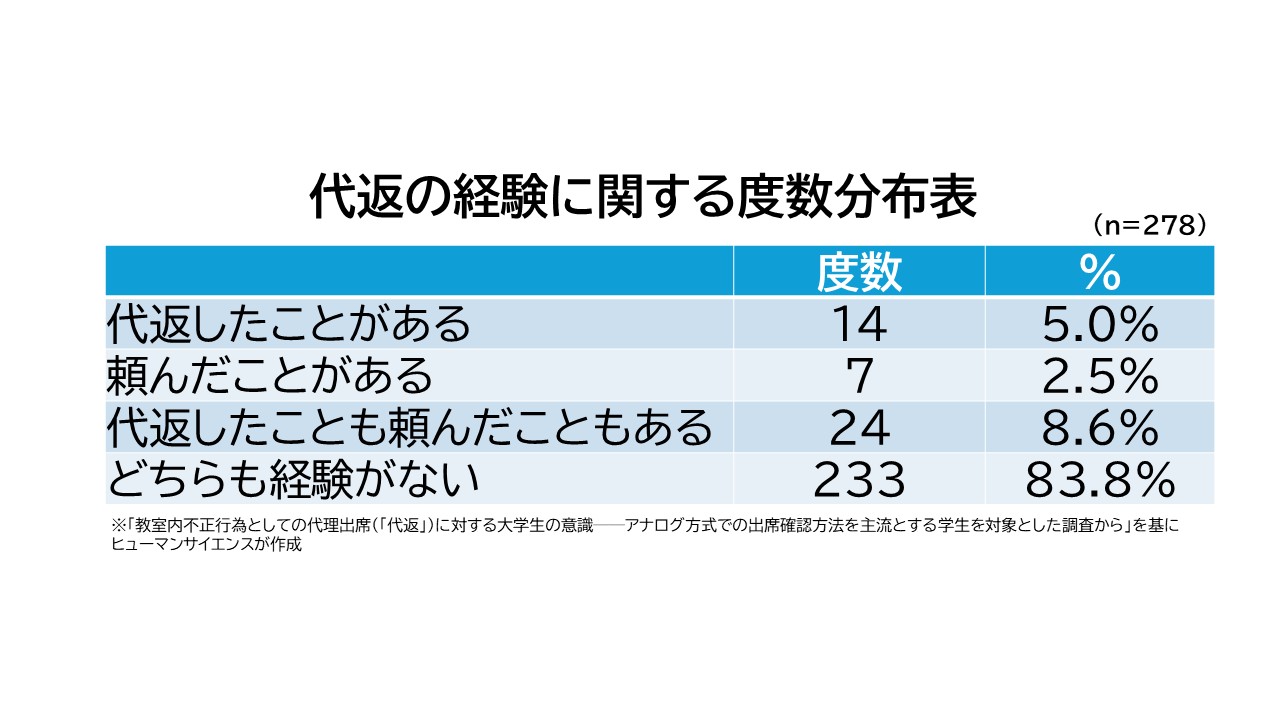
In the paper "University Students' Awareness of Proxy Attendance ('Daihen') as Classroom Misconduct: A Survey Targeting Students Who Mainly Use Analog Attendance Confirmation Methods", a survey was conducted with 294 university students. The results revealed that 5.0% of students had acted as a proxy, 2.5% had asked someone to proxy for them, and 8.6% had both acted as a proxy and asked for a proxy, showing that a total of 16.1% of students had some experience with proxy attendance in some form.
The same survey also revealed students' attitudes toward proxy attendance. When comparing proxy attendance and cheating, a majority of students believe that cheating is a more serious offense than proxy attendance. However, many students are negative about the idea that "even if proxy attendance is caught, it won't be such a big deal," indicating that they recognize proxy attendance as a wrongful act.
This survey reveals that students perceive proxy attendance as "something wrong, but lighter compared to cheating" and act accordingly.
1-2. From "Proxy Attendance" to "Pi-Nige"—How Digitalization Changes the Form of Fraud
In the past, students used analog methods to falsify attendance, such as changing their voice to respond on behalf of a friend ("proxy attendance") or altering handwriting to write a friend's name in a paper attendance book.
Since the 2000s, attendance confirmation systems using IC card-type student IDs and smartphones have been introduced, enabling more precise attendance management than before. However, digitalization has also given rise to new forms of fraudulent attendance.
A typical example is "Pi-nige". This term refers to the act of holding a student ID over an IC card reader to trigger the attendance registration sound ("pi") and then immediately leaving the classroom. Although the system records the student as present, they are not actually attending the class. This method exploits the blind spot in large lectures where instructors cannot monitor individual students' entry and exit.
From "Proxy Attendance" to "Pi-Nige" — The names and methods change with the times, but the cat-and-mouse game between schools and students continues to this day.
1-3. Teachers' Ingenuity and Measures to Prevent Fraudulent Attendance

As measures to prevent fraudulent attendance, some universities have implemented campus-wide systems such as attendance tracking using IC cards, but many organizations still rely on analog methods due to reasons like budget constraints. Even with the introduction of IC cards, there are loopholes, so ultimately the responsibility for countermeasures falls on the instructors. What kinds of measures do teachers take to prevent fraudulent attendance? Here is one example.
・Randomize the Method of Taking Attendance
If attendance is taken at the beginning of class or at a fixed time, students who engage in fraudulent attendance will target that time to come to the classroom. To prevent this, some instructors take attendance using random methods and at random times each session. For paper attendance cards, this might mean changing the color of the paper each time; for IC card readers, it could involve taking attendance at random times during the class. By doing so, students are compelled to attend every class, which may reduce fraudulent attendance.
・Combine with Tests or Reflection Papers
Some teachers require students to submit tests or reflection papers each time that cannot be answered without attending the class, and consider attendance based on the content. Although cheating is possible if the class content is shared, this method is more effective than simply checking attendance.
・Combine with Group Work
Incorporate group work into the class and have students list the names of those who participated in their group and submit it. Since students are watching each other, this can significantly prevent fraudulent attendance. However, it is a drawback that this approach is not practical for lectures where group work is unnecessary.
2. Attendance Management Using Moodle
To address such issues of fraudulent attendance, a commonly used solution in organizations utilizing Moodle is the Moodle plugin "Automatic Attendance." Automatic Attendance does not require dedicated terminals and enables flexible attendance management within the existing Moodle environment.
* The basic functions of Moodle are explained in detail in the article below.
>[Moodle Basic Course] What can the e-learning management system Moodle do?
2-1. What can be done with Moodle's automatic attendance?
Moodle allows functionality expansion through plugins, and attendance management can also be implemented by adding plugins. A major advantage of Moodle is its high extensibility. By combining necessary plugins according to the purpose, it is possible to build a flexible system tailored to each university's operational policies. Even for attendance management, there is no need to introduce new equipment or systems; you can start using it immediately just by installing the plugin.
The Moodle automatic attendance feature allows you to do the following.
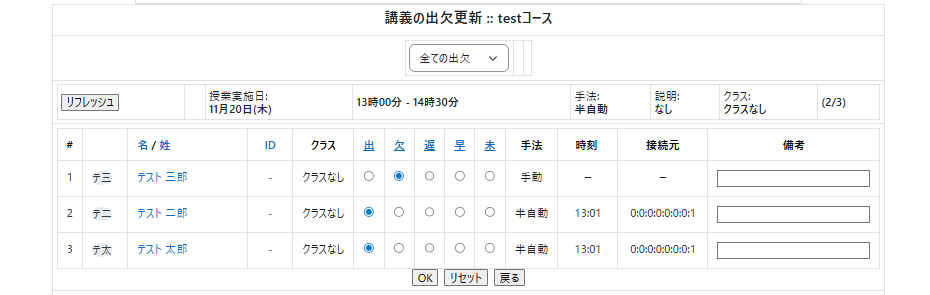
・Real-time management of attendance status
You can grasp students' attendance status in real time. It is possible to automatically determine attendance, tardiness, or absence status according to the set time.
・Measures Against Fraudulent Attendance
You can set conditions to prevent fraud, such as requiring password entry and restricting IP addresses. It is also possible to set different conditions for each class.
・Display and Export Attendance Data Lists
You can view and export lists of attendees and attendance rates for each class. It is also easy to check individual students' attendance rates, which can be utilized for grade management.
2-2. (For Administrators) How to Install the Automatic Attendance Plugin
The automatic attendance feature is not available in the standard Moodle. First, the administrator needs to install and configure the plugin for automatic attendance.
■Required Plugins
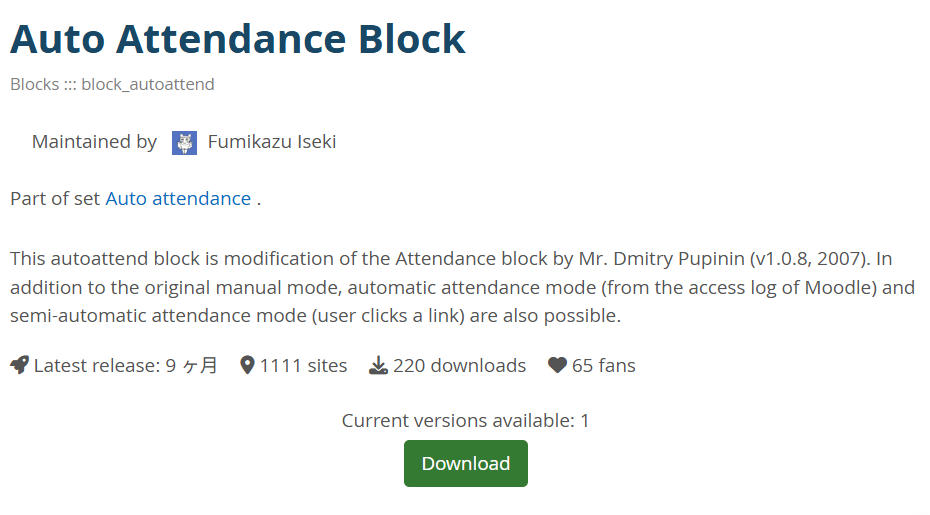
・Auto Attendance Block
・Autoattendance module
■Installation Method
Refer to the following page on Moodle.docs to perform the installation.
https://docs.moodle.org/2x/ja/Autoattendance_block
2-3. (For Teachers) How to Set Up Automatic Attendance
Next, we will explain how teachers can set up automatic attendance.
The automatic attendance settings are divided into two stages: overall automatic attendance settings and settings for each class.
■ Add the Automatic Attendance Module
1) From "Add an activity or resource," select "Automatic Attendance."
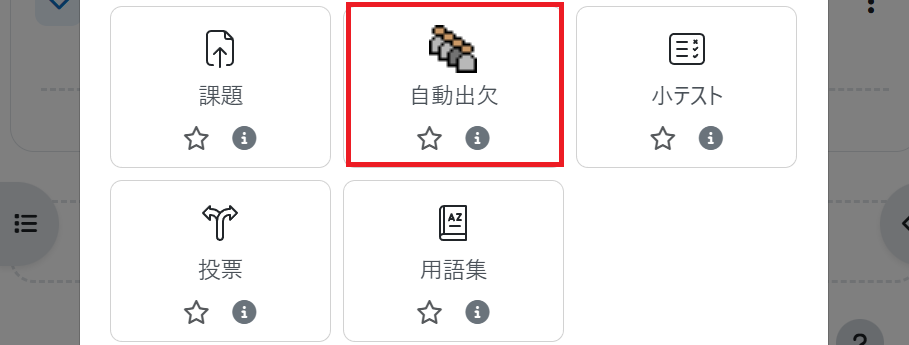
2) The auto attendance settings screen will be displayed. Without changing the settings, select "Save and return to course."
3) The auto attendance module has been added here.
There is one auto attendance module per course, and from here you will register information for each class.
■Register Classes
1) Click the automatic attendance module to display the "Class List" screen.
Please click "Register Classes" at the top of the screen.
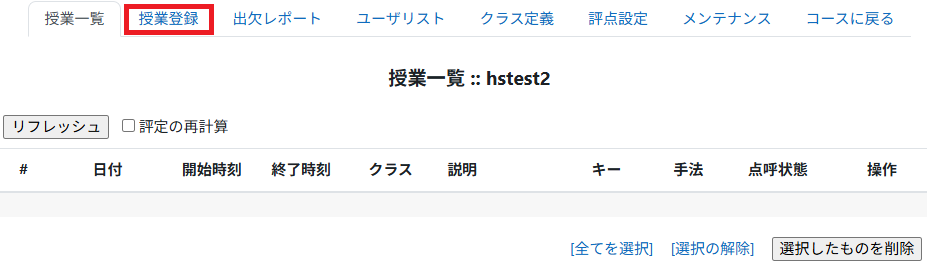
2) A screen titled "Register Multiple Classes" will be displayed.
Let's try registering a class as shown below.
[Class Example]
・Course Period: April 1, 2025 – July 30, 2025
・Class Time: Every Thursday from 10:30 a.m. to 12:00 p.m. (90 minutes)
・Attendance Conditions
・Present: 10:20 a.m. – 10:30 a.m. (10 minutes before class start until class start)
・Late: 10:30 a.m. – 10:50 a.m.
・Absent: 10:50 a.m. – 12:00 p.m.
The Moodle settings are configured as follows.
| Setting Item | Setting Value |
|---|---|
| Attendance Confirmation Method | Semi-automatic |
| Class Start Date | April 1, 2025 |
| Class End Date | July 30, 2025 |
| Class Day | Thursday |
| Interval | 1 week |
| Class Start Time | 10:20 a.m. (Attendance start time) |
| Class Duration | 30 minutes (time from attendance start to absence) |
| Allowed tardiness time | 10 minutes (time from attendance start to tardiness) |
3) The class has been registered here.
Return to the class list and check that the class has been properly registered.
If you want to strictly check class attendance, it is also possible to restrict attendance keys or IP addresses.
2-4. Cannot be prevented by automatic attendance alone! Measures against fraudulent attendance in Moodle
The automatic attendance feature can require password input or restrict by IP address, but if passwords are leaked or IDs are lent between students, fraudulent attendance cannot be prevented. Therefore, if stricter management is desired, additional measures need to be taken by the instructor.
・Combine with quizzes, feedback, and assignments
By combining quizzes, feedback, and assignment submissions that only those who attended the class can answer, it is possible to suppress fraudulent attendance. While it is also possible to ask attendees about the content, it takes more effort and time than simply pressing the attendance button on their behalf, so many teachers set this up together with automatic attendance.
・Require submission of attendance cards on paper as well as recording automatic attendance
Comparing both paper and web results is also an effective method. It is not necessary to do this every time, but for example, by using the last five minutes of a lecture to have students submit their impressions of the day on paper and then comparing that with Moodle's automatic attendance results, you can check whether fraudulent attendance is occurring. Since fraudulent attendance is more likely to happen in classes where attendance is confirmed using the same method every time, irregular checks can also serve as a deterrent to students.
3. FAQ|Common Questions About Automatic Attendance Explained by the Moodle Support Desk
From here, we will explain frequently asked questions about Moodle's automatic attendance feature that are often received by the support desk.

3-1. What is the difference between the automatic mode and semi-automatic mode of Moodle automatic attendance?
A: In automatic mode, attendance is recorded simply when a student accesses the course, whereas in semi-automatic mode, attendance is recorded when the student opens the automatic attendance module.
In automatic mode, attendance is recorded automatically as soon as a student accesses the course. No special operation is required, and simply opening the course page counts as attendance, which minimizes the effort needed for attendance confirmation.
On the other hand, in semi-automatic mode, attendance is recorded when the student opens the "Automatic Attendance Module." Furthermore, in semi-automatic mode, it is possible to require the input of an attendance key. If an attendance key is set, the instructor provides the key to the students during the lecture, and attendance is confirmed only when the students enter that key. This system prevents attendance from being recorded simply by accessing the course and allows for stricter management of students who are actually participating in the class.
However, since the attendance key may be shared with others, it cannot completely prevent fraudulent attendance. Therefore, the attendance key should be used only as a supplementary mechanism and ideally combined with other methods as needed.
3-2. I set the classroom's IP address, but a student said they cannot access it. Why is that?
A: It is possible they are accessing from a network outside the classroom.
There is a possibility that the student is accessing from a different network, such as their smartphone's data connection, rather than the campus LAN. In that case, the classroom's IP address will not be recognized, and the automatic attendance will not function correctly. Check the student's access logs and confirm whether they are actually connected to the classroom network when opening the automatic attendance.
4. Summary|Achieving Efficient Attendance Management with Moodle's Automated Attendance
Fraudulent attendance such as proxy attendance and skipping without permission continues to exist, changing its form over time. The Ministry of Education, Culture, Sports, Science and Technology requires 45 hours of study per credit according to university establishment standards, and attendance confirmation for classes, which forms the foundation of this, is an indispensable element in ensuring the quality of university education.
The Moodle automatic attendance plugin can be introduced into an existing Moodle environment, keeping initial costs low, and it also offers robust anti-fraud features such as password and IP address restrictions. However, the automatic attendance function alone cannot completely prevent fraudulent attendance; combining it with quizzes, feedback, and assignment submissions enables more effective attendance management.
If you would like to try using the automatic attendance plugin or want to consult about an operation method suited to your school, please feel free to contact us regarding any issues with Moodle. Our company offers support for plugin implementation as well as help desk outsourcing services related to Moodle operation, providing optimal solutions tailored to your institution's situation.
Moodle Related Information
About the Author