








2025.12.12
What are the differences between Moodle 5.0 and the 4.x series? A thorough explanation of the main changes and new features

-
Category
Recommended Articles
-
[Moodle Manual ③] 2025 Edition | Support Staff Explain How to Set Up and Utilize Forums!
-
[Moodle Manual ②] 2025 Edition|How to Create Quizzes, Setup Procedures, and FAQ Explained by Support Staff!
-
[Moodle Manual ①] 2025 Edition|How to Set Assignments & Tips for Use Explained by Support Staff!
-
What is Vyond? Introducing the benefits of an animation video production tool that can be used for business.
-
[Animation Teaching Material Production] How to Create e-Learning Materials ②
-
How does Vyond differ from other animation production software? Comparison and recommendations
-
Can Vyond animations be used as teaching materials? Here are the benefits of using them in e-learning and training.
-
Let's create business animations with Vyond! An explanation of the reasons and benefits recommended for business, as well as challenges.
-
Vyond Go (AI Video Generation) Tips and Best Practices ① Vyond Go Setup Guidelines
-
Moodle Basic Course: What is Moodle?
-
[Moodle Basic Course] What can the e-learning management system Moodle do?
-
[Moodle Basic Course] What can be done with Moodle's default features
-
Benefits and Considerations of Moodle Cloud Services
-
Moodle is not only used by universities (widespread use)



Moodle 5.0 was released on April 14, 2025. Although it is not an LTS (Long Time Support) version, many administrators are probably curious about what differences the new 5.0 has compared to the 4.x series.
The most noticeable changes are, of course, the appearance and usability. When transitioning from the 3.x to the 4.x series, the user interface was significantly revamped, which placed a considerable burden on administrators, including holding briefing sessions for teachers and students and completely revising manuals. There are also many concerns that updating to Moodle 5.0 might cause similar confusion again.
This article provides a detailed introduction to the latest Moodle 5.0, explaining from the perspective of teachers and students what has changed compared to the 4.x series and what has become easier to use.
Table of Contents
- 1. What is Moodle 5.0? Basic Knowledge of Version Management 1-1. Types of Version Upgrades
- 2. Latest Version Moodle 5.0 What Has Changed! Easy-to-Understand Explanation from Teacher and Student Perspectives 2-1. [Moodle 5.0 New Feature ①] Activity Tab List Display Function
- 3. Summary | Moodle 5.0 is an Update that Supports the Field
1-2. The Latest Version Isn't All Good!? The Reality of Version Upgrade Strategies
1-3. Current Version Status and Update Plans
1-4. The Most Widely Used Version Currently
2-2. [Moodle 5.0 New Feature ②] Major Enhancement of the Question Bank Function
2-2-1. Cross-Course Question Sharing Now Possible
2-2-2. Dramatic Improvement in Question Bank Search Function
2-3. [Moodle 5.0 New Feature ③] Automatic Application of Late Submission Penalties for Assignments
2-4. [Moodle 5.0 New Feature ④] Strengthening of AI-Related Features
1. What is Moodle 5.0? Basic Knowledge of Version Management
Moodle is an LMS with many users worldwide. Version updates are made about eight times a year, ranging from minor security fixes to feature additions. Here, we will explain the basic knowledge about Moodle version upgrades.
1-1. Types of Version Upgrades
There are three main types of Moodle version upgrades. Minor version upgrades primarily address security and bug fixes, major version upgrades include improvements in usability and new features, and among the major versions, there is the LTS version which has an extended support period.
Let's take a closer look below.
Minor Version Upgrade
Updates focused mainly on security patches and bug fixes, performed approximately once every two months. For example, an update from 4.1.x to 4.1.y falls under this category. The impact on usability is minimal, and regular application is recommended to maintain system stability and security.
Major Version Upgrade
Updates that include improvements in usability and the addition of new features, occurring once every six months. For example, transitions from 3.x to 3.y fall under this category. Also, when the first digit of the version number changes, such as from 3.x to 4.x or from 4.x to 5.x, it often involves changes to the UI/UX, which may require user training and manual updates.
LTS (Long Term Support) Version
This is a version within the major releases that is set with an especially long maintenance period. The current latest LTS is 4.5, and because it guarantees longer-term support than the regular versions, it tends to be widely adopted by large educational institutions and enterprises.
1-2. The Latest Version Isn’t Always Perfect!? The Reality of Version Upgrade Strategies
While upgrading to the latest version is ideal for security, careful judgment is required in actual operational environments. This is because new versions also carry risks such as the following.
・Compatibility issues with existing plugins
・Possibility of new bugs occurring
・User learning curve
Therefore, many administrators adopt a prudent strategy of repeatedly applying minor version upgrades to versions with a certain track record of use, and then updating to the LTS version when the end of support approaches.
1-3. Current Version Status and Update Plan
The support end date for the current latest LTS version 4.5 is October 2027, and the next LTS release is scheduled for October 2026. In other words, the period from October 2026 to October 2027, about one year, will be an important time for many operators to consider and implement upgrading to the 5.x series.
Looking ahead to this period, understanding the features and changes of version 5.0 from now is extremely important for creating a smooth migration plan.
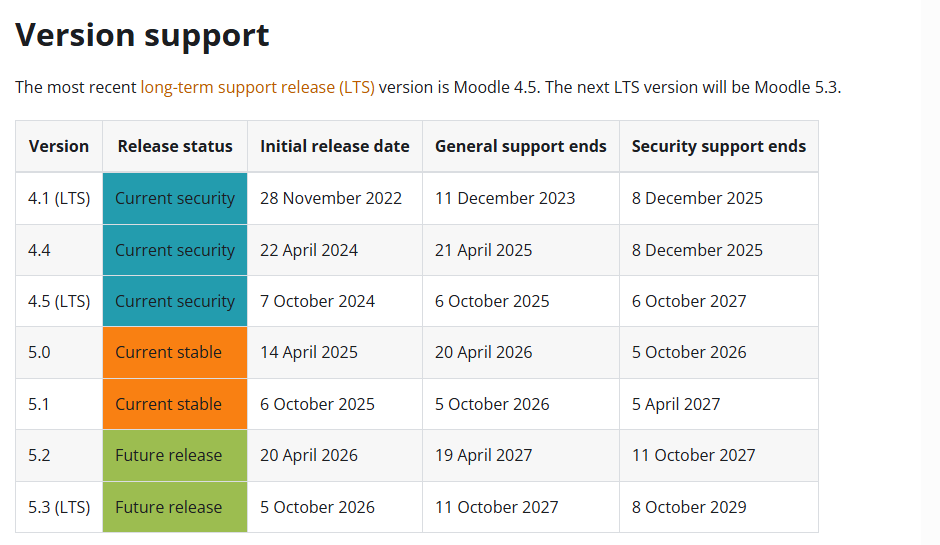
(Image source: Moodle.org https://moodledev.io/general/releases)
1-4. The Most Widely Used Version Currently
Among the many Moodle users worldwide, the most widely used version at present is the latest LTS version, 4.5. On the other hand, the usage rate of the latest 5.0 has also reached 20%, indicating the presence of early adopters. This can be seen as an indicator of a certain level of trust in the stability of 5.0.
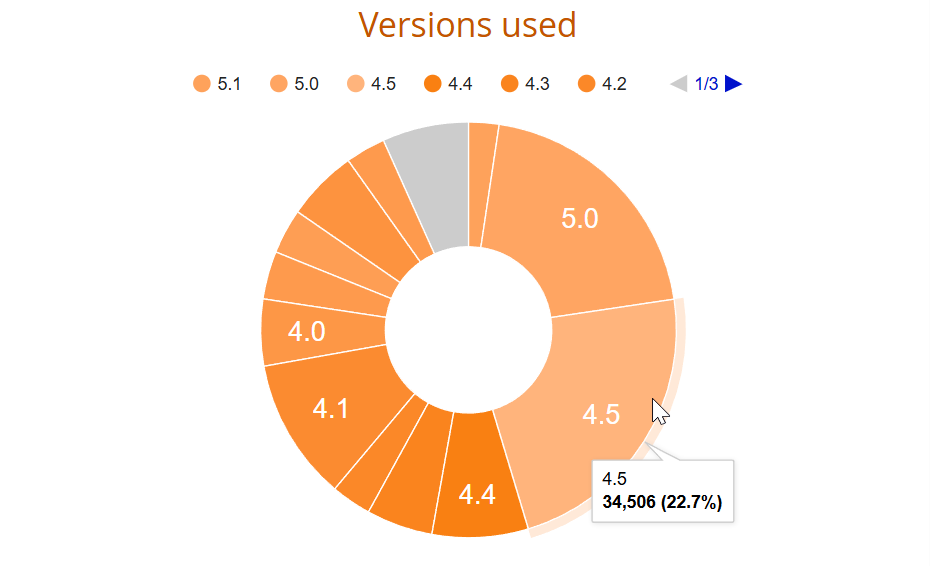
(Image source: Moodle.org https://stats.moodle.org/) *As of November 2025
What is even more noteworthy is the fact that a certain number of users are still using unsupported versions of Moodle. For versions past their support period, no security patches will be provided even if vulnerabilities are discovered.
The following are the specific security risks that can be anticipated.
・SQL Injection Attack: Unauthorized access to the database may lead to leakage of students' personal information and grade data.
・Cross-Site Scripting (XSS) Attack: Execution of malicious scripts may result in administrator privilege takeover or malware infection risks.
・Authentication Bypass: Unauthorized access exploiting vulnerabilities in the login function.
・Abuse of File Upload Function: Uploading malware or intrusion into the server.
Security risks are directly linked to legal liabilities. We strongly recommend planned version upgrades while keeping the upcoming upgrade schedule in mind. If you are uncertain about handling this in-house, consider utilizing support services from official Moodle partners.
2. Latest Version Moodle 5.0 What Has Changed! Easy-to-Understand Explanation from Teacher and Student Perspectives
To conclude, Moodle 5.0 does not have significant differences in appearance or basic operations compared to the 4.x series. This is very good news for site administrators. There is no need to worry about large-scale training or confusion like when migrating from the 3.x to 4.x series.
This update includes highly user-friendly feature additions and improvements for teachers and students, reflecting the voices of users.
Main Changes in Moodle 5.0
・List display function via Activity tab
・Cross-course question bank usage feature
・Enhanced search function for the question bank
・Automatic application of late submission penalties for assignments
・Strengthened AI-related features
Now, let's take a closer look at each feature.
2-1. [New Feature in Moodle 5.0①] List Display Function with Activity Tab
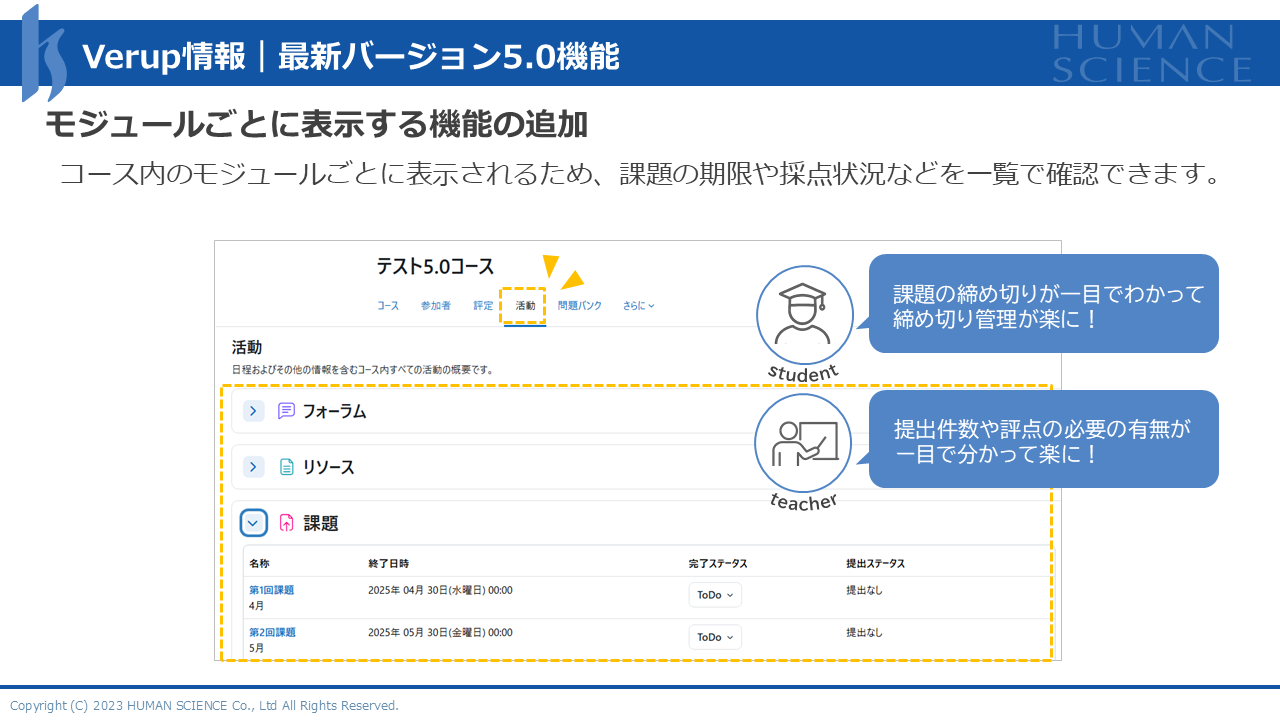
In Moodle 5.0, a new "Activity" tab has been added to the course screen, allowing all materials, assignments, and quizzes within the course to be grouped and displayed by type.
Until now, when there were multiple quizzes and assignments within a course and their submission or exam periods overlapped, the problem of "not knowing when the deadline for which assignment was" frequently occurred. Especially for students, managing deadlines is a matter of life and death. Points deductions and penalties for late submissions directly affect grades and, in some cases, impact credit acquisition. On the other hand, teachers also spent time on verification tasks such as "checking for any missed grading" and "ensuring no expired submissions were overlooked."
In version 5.0, since you can switch the display by module type, students can see deadlines at a glance, making schedule management easier. Additionally, teachers can view a list of ungraded assignments and those with approaching grading deadlines, significantly reducing the risk of missing grading tasks.
2-2. [Moodle 5.0 New Feature ②] Major Enhancement of the Question Bank Function
2-2-1. Cross-Course Question Sharing Now Possible
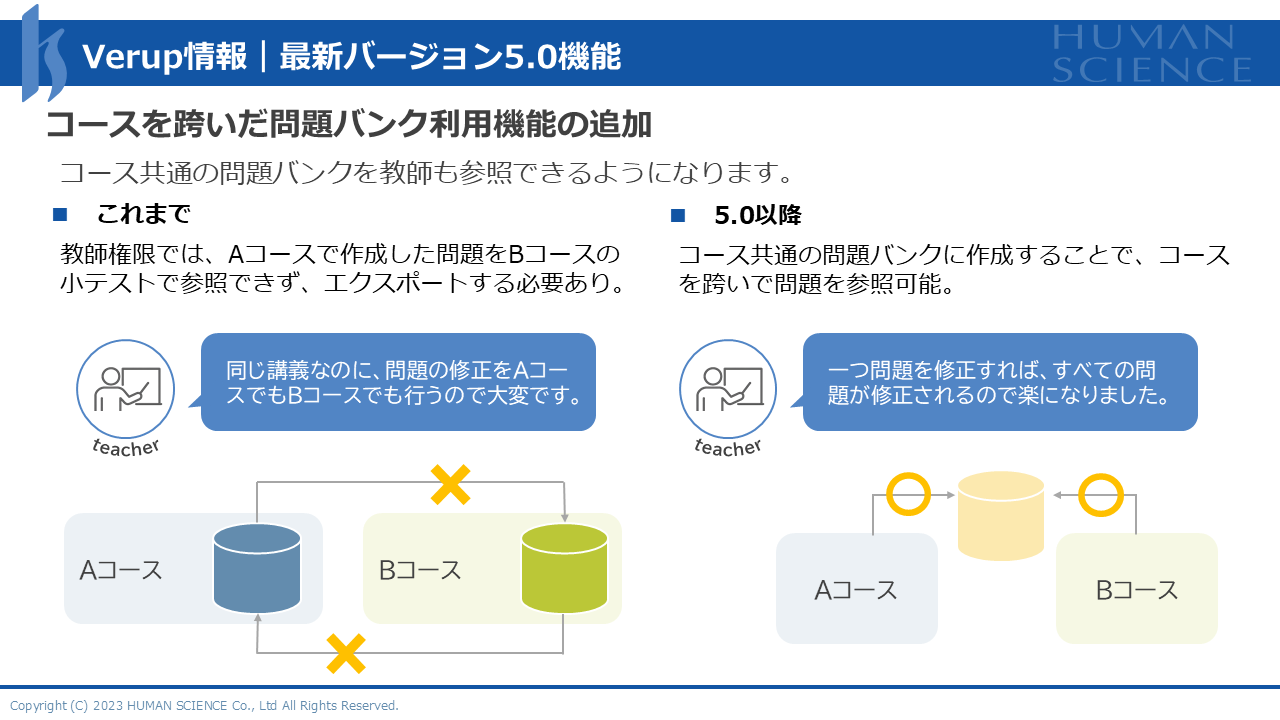
In Moodle 5.0, a shared question bank that can be used across courses has been introduced. Previously, question banks were independent for each course, so teachers handling the same subject across multiple classes or departments conducting common tests had to copy the same questions into each course one by one. Moreover, when modifying questions, the same corrections had to be repeated for all courses, causing redundant and multiple layers of work.
In version 5.0, once you create a shared question bank and register questions, they can be used simply by referencing it from each course. Centralized management of questions becomes possible, and any corrections made in one place are automatically reflected across all courses. For teachers managing hundreds of questions annually, this will lead to a significant reduction in working time.
2-2-2. Dramatic Improvement in Question Bank Search Functionality
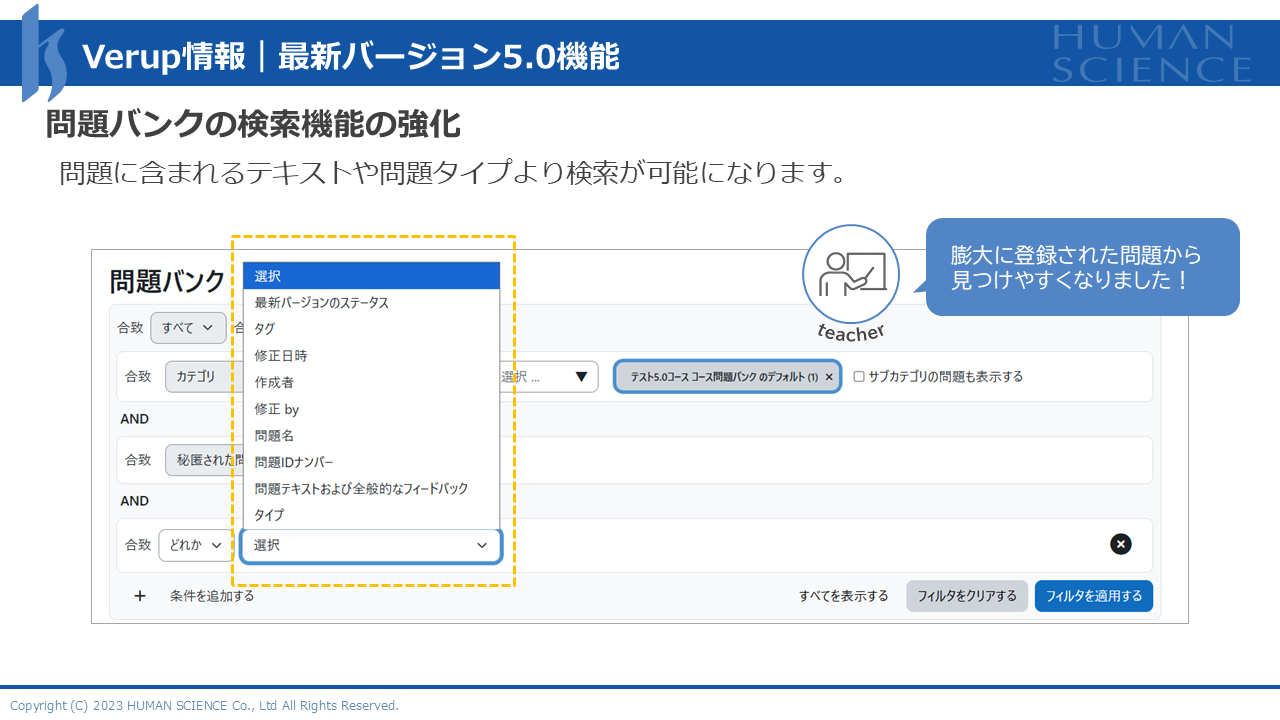
In Moodle 5.0, the search functionality of the question bank has also been significantly enhanced. Previously, the search capabilities were limited, allowing searches only by certain fields such as question ID or question name. For teachers who have been using Moodle for many years, it is not uncommon to have over 10,000 questions accumulated in the question bank, and many may have experienced the frustration of "I’m sure I created that question, but I can’t find it..."
In version 5.0, it became possible to search and extract not only the main text of the question but also various items such as choices, question tags, and modification dates. For example, by entering the keyword "photosynthesis," you can instantly extract all related questions. This allows for efficient management and reuse of a large number of questions, significantly reducing the burden on teachers.
2-3. [Moodle 5.0 New Feature ③] Automatic Application of Late Submission Penalties
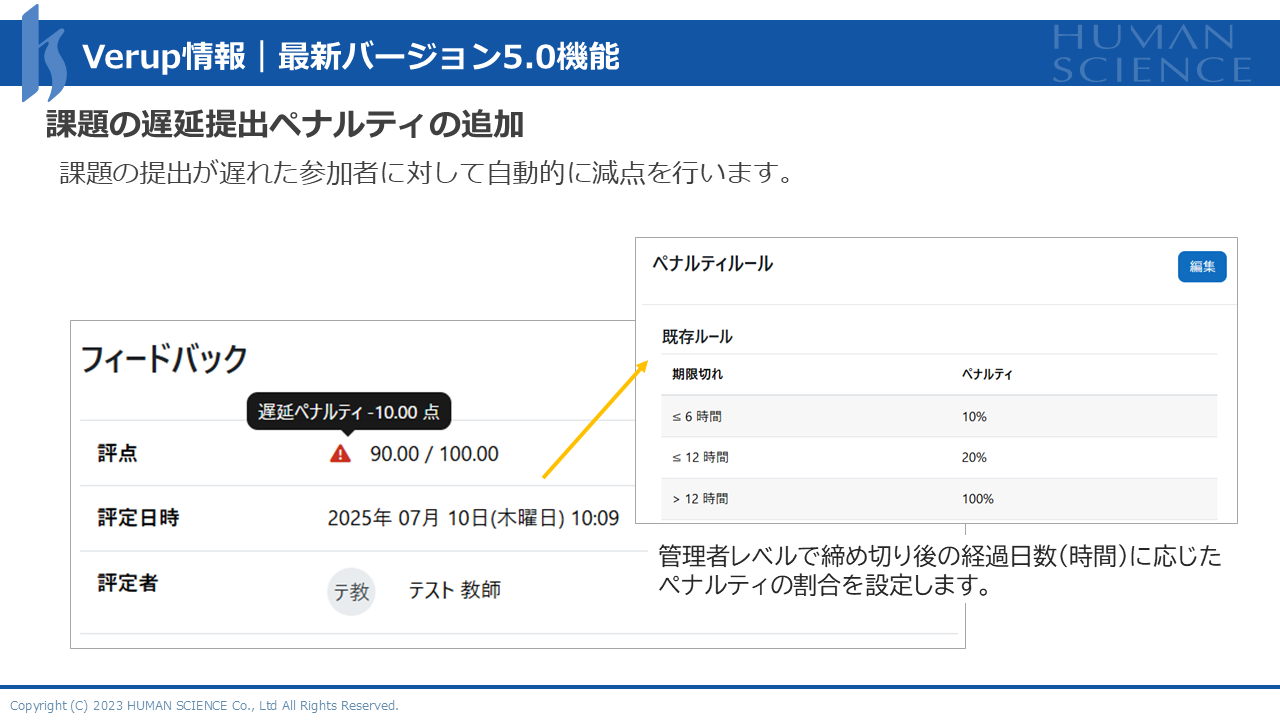
Moodle 5.0 has added a feature that automatically applies penalties for late submissions. Previously, when applying rules such as "10% deduction for each day late," it was necessary to check the submission date and time, calculate the number of days late, determine the deduction rate, and manually adjust the grade. The more students in the class, the more time-consuming this task became.
In version 5.0, site administrators set the basic rules such as the deduction rate, and teachers only need to select "Apply penalty" when creating an assignment. The system then automatically calculates the deductions. Since the deductions are already reflected at the time of grading, the teacher's workload is greatly reduced.
2-4. [Moodle 5.0 New Feature ④] Enhancement of AI-Related Functions
In Moodle 5.0, AI-related functions have been significantly enhanced. The main features added in 5.0 are explanation generation within pages and AI usage reporting functions.
The explanation generation feature within pages allows teachers to receive AI support when creating content, which is expected to improve the efficiency of instructional material development. Additionally, the AI usage report feature visualizes how AI is being utilized within courses. This enables an understanding of AI usage across the entire organization, providing significant benefits in site management aspects such as cost control, policy formulation, and curbing excessive use.
3. Summary|Moodle 5.0 is an Update That Supports the Field
Moodle 5.0 is an upgrade that significantly improves practicality while minimizing the impact on teachers and students, without large-scale UI/UX changes like those seen in the transition from version 3 to 4. Many features reflecting feedback from the field have been added, such as improved task management through the Activity tab, centralized question management via the common question bank, automatic application of penalties for late submissions, and enhanced AI functions.
Currently, support for the latest LTS version 4.5 will end in October 2027, and the next LTS version is scheduled for release in October 2026. This approximately one-year period will be an important time for many administrators to consider and carry out the upgrade to the 5.x series.
However, caution is necessary when upgrading. There are quite a few cases where "the upgrade was carried out in-house, but due to poor compatibility with customized parts, the system stopped functioning properly." Especially in environments with many plugins installed, prior compatibility verification is essential.
To avoid such troubles, please be sure to consult Human Science, an official Moodle partner. Based on extensive implementation and operational experience, we will support a safe version upgrade.
▽How to Support Moodle Operation? Here Are Case Studies of Introducing a Specialized Help Desk
Instantly Solve Moodle "Troubles" with a Highly Specialized Help Desk (Gakushuin University)
Inquiry Response Time Reduced to One-Tenth with a Help Desk for Faculty and Manual Publication! (Tokyo University of Science)
Moodle Related Information
About the Author