







2025.12.12
2025.12.12
Introduction to New Vyond Features (December 2025)

-
Category
Recommended Articles
-
What is Vyond? Introducing the benefits of an animation video production tool that can be used for business.
-
[Animation Teaching Material Production] How to Create e-Learning Materials ②
-
How does Vyond differ from other animation production software? Comparison and recommendations
-
Can Vyond animations be used as teaching materials? Here are the benefits of using them in e-learning and training.
-
Let's create business animations with Vyond! An explanation of the reasons and benefits recommended for business, as well as challenges.
-
Vyond Go (AI Video Generation) Tips and Best Practices ① Vyond Go Setup Guidelines
-
Moodle Basic Course: What is Moodle?
-
[Moodle Basic Course] What can the e-learning management system Moodle do?
-
[Moodle Basic Course] What can be done with Moodle's default features
-
Benefits and Considerations of Moodle Cloud Services
-
Moodle is not only used by universities (widespread use)



Pronunciation Adjustment Feature Added to Synthetic Voice! (Enterprise/Agency Plans Only)
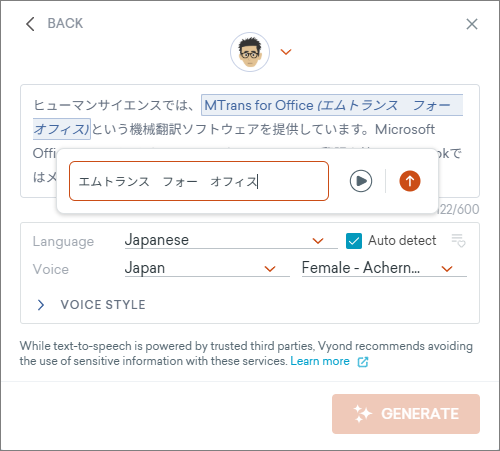
Vyond's Text-to-Speech now features a Pronunciation Editor!
This makes it easier to correct proper nouns, abbreviations, and misreadings of Japanese.
▼What can you do now?
- You can freely set the pronunciation for each word
- You can adjust while listening to the pronunciation
With this feature, you can correct mispronunciations such as the following.
- Personal names (e.g., Nakajima → Nakajima / Nakashima)
- Company names, product names (e.g., MTrans → Emtrans)
- Legal and technical terms, etc.
▼Usage is very simple
- Select text in the AUDIO SETTINGS window and click "Add pronunciation"
- Enter the reading (input possible in hiragana, katakana, romaji, etc.)
- Play back and check with the [Preview] button
2. Avatar creation made smoother! Introducing the "Seamless Avatar Workflow"
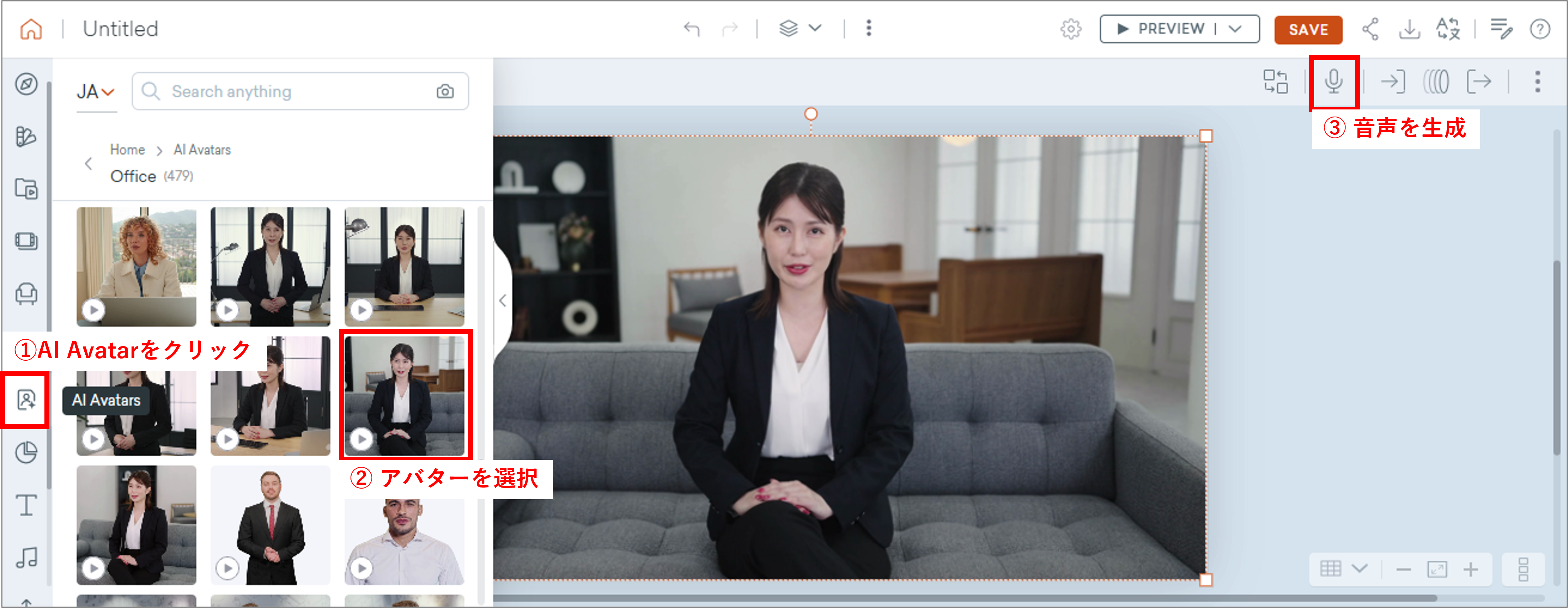
Another major update is the improvement of the avatar editing features.
Previously, AI avatars could only be created on a dedicated AI avatar screen, but now you can call up and create avatars directly from Vyond’s regular editing screen.
This update allows you to easily embed avatars within videos and animations.
▼What can you do now?
- Calling AI avatars from the animation editing screen
- Have the called avatar read any script
This greatly reduces the back-and-forth stress of
"Create avatar → Return to video screen → Edit again → Return again..."
▼Usage is very simple
- Open the standard animation editing screen
- Select "AI Avatars" from the left panel and place the desired avatar
- Enter the text for the avatar to speak from the "Dialog" button at the top right
▼Especially appreciated points
- Significantly improved editing efficiency in corporate training videos handling a large number of avatars
- Avatar editing work is smooth, reducing rework
3. Other Updates
Various other updates have also been made.
- Addition of Templates:
Templates for easily creating videos have been further enhanced. - Addition of Synthetic Voice Speakers:
7 new voice speakers have been added. - Addition of Layouts for Vyond Go:
24 new layout templates have been added.
Various other updates are made every month.
We are now accepting applications for a 2-week free trial! Please try out the features first.
Related Services Useful for Vyond Beginners
Vyond License Sales
At Human Science, we offer the following support services to help even first-time Vyond users start video production smoothly.
Human Science Corporation is an official agent and handles contracts for various Vyond plans.

Vyond Usage Guide
This is a downloadable resource introducing how to use Vyond. It allows you to experience creating an animation from start to finish using the Template Library. Even if you are new to video editing, you can master the basic usage.
Vyond Certified Reseller Human Science
The animation tool Vyond was created by a video production tool development company based in Silicon Valley, USA. In May 2018, they renewed their online animation creation web service and released the "Vyond Platform."
Human Science has a proven track record of video production using Vyond and became a certified reseller in 2023.
Vyond Related Information
- 2026.06.17
- How to Use PowerPoint × Vyond Effectively