







2026.03.31
Introduction to New Vyond Features (March 2026②)

-
Category
Recommended Articles
-
What is Vyond? Introducing the benefits of an animation video production tool that can be used for business.
-
[Animation Teaching Material Production] How to Create e-Learning Materials ②
-
How does Vyond differ from other animation production software? Comparison and recommendations
-
Can Vyond animations be used as teaching materials? Here are the benefits of using them in e-learning and training.
-
Let's create business animations with Vyond! An explanation of the reasons and benefits recommended for business, as well as challenges.
-
Vyond Go (AI Video Generation) Tips and Best Practices ① Vyond Go Setup Guidelines
-
Moodle Basic Course: What is Moodle?
-
[Moodle Basic Course] What can the e-learning management system Moodle do?
-
[Moodle Basic Course] What can be done with Moodle's default features
-
Benefits and Considerations of Moodle Cloud Services
-
Moodle is not only used by universities (widespread use)


Vyond is a cloud-based service used for a wide range of purposes, including business videos and educational content. The update on March 26, 2026, included numerous changes that greatly expand the range of expression.
In this blog, we introduce Vyond's new features as part of this update, such as highly expressive synthetic voices based on generative AI, video generation AI functions, and the addition of new character styles.
◆High-Quality Generative AI Voice Gemini TTS 2.5 Pro Implemented (Available for: Enterprise/Agency Plans)
The text-to-speech feature has been enhanced with Gemini (Google), the latest generative AI-based synthetic voice.
It is possible to express including emotional expression, and by specifying expressions such as "in a presentation style," "excitedly," or "with an accent" in the "Instructions," you can express a wide variety of scenes with high quality that was not possible with conventional synthetic voices.
A concern is that, since generative AI is used, there may be variations in expression each time it is generated. However, this also has the advantage that you can regenerate repeatedly until you get an output that better matches your image.
* When regenerating audio, it is recommended to duplicate the existing audio beforehand.
◆Other Features
- Supports over 70 languages, including Japanese
- The recently implemented "Pronunciations" feature is also available, along with dictionary registration
◆How to Use
You can access this feature by following any of the procedures below.
- Select "Text to speech" from "Popular tools" on the top page
* For audio-only generation. If you want to use it within animations/videos, please follow the next procedure. - In the editing screen, select a character and from the "Dialog" button at the top right,
choose "ADD DIALOG" > "Text-to-speech"
* You can directly set the voice for the selected character. - Open "Audio" from the left menu in the editing screen, and select "Text-to-speech" from the "Add Audio" button at the top right.
* You can generate audio not linked to any character (linking to a character later is also possible).
◆Video Generation AI Veo 3.1 Fast / Kling 2.6 Implemented (For: Enterprise / Agency Plans)
A new video generation AI feature has been implemented.
This is different from the conventional Vyond Go and is a function that generates videos in various styles such as live-action and animation. It allows you to create a wide range of videos without being limited to the traditional Vyond character styles.
Videos are generated from prompts (instructions, for example, "a robot moving inside a factory"). You can also specify an image, allowing videos to be generated based on that image.
A concern is that results may be generated without secured copyrights, so it is very important to carefully check the prompts used, reference images, and the generated results.
Additionally, there are the following restrictions on the videos that can be generated.
- Veo: 4 seconds
- Kling: 5 seconds
◆How to Use
- On the Vyond homepage, select the "+Create" button and then choose "Text to video clip"
- From "Popular tools" on the Vyond homepage, select "Text to video clip"
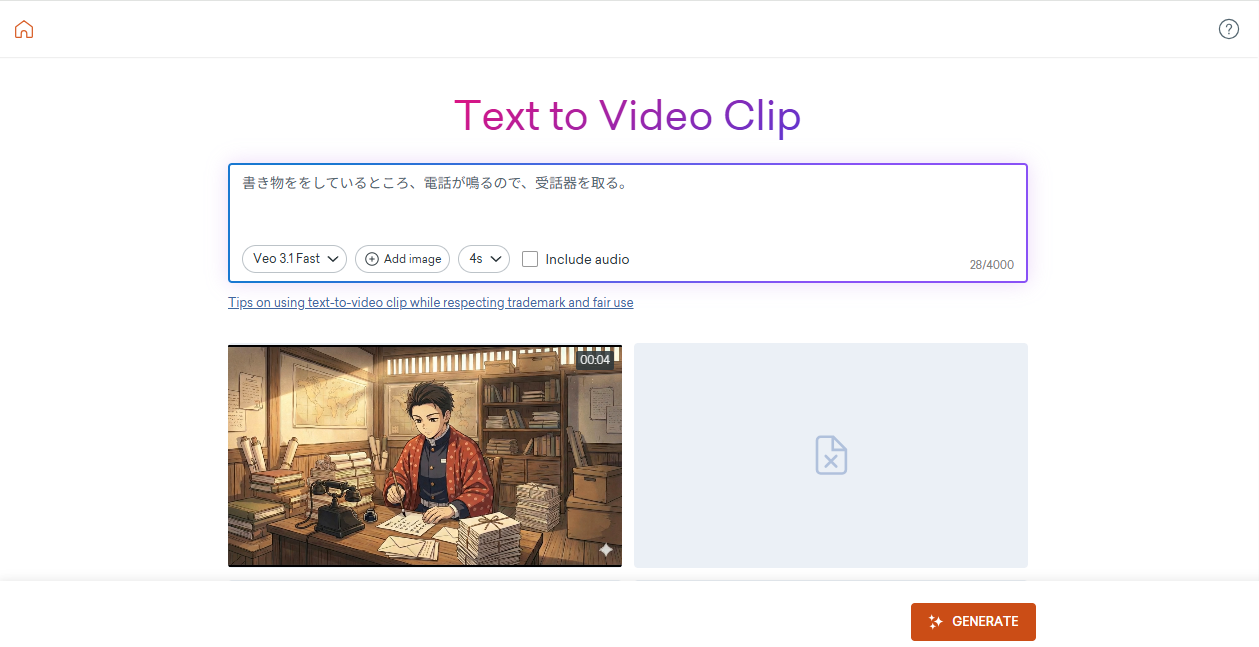
The generated video can be embedded into the animation/video you create by following the steps below.
- 1. Select the "Download" button on the generation result screen
- 2. In the Vyond editing screen, either drag and drop the downloaded video file, or open the left menu "Uploads" and upload the file by selecting "Upload File" at the top right
- 3. Uploaded videos can be accessed anytime from "Your Uploads" under "Uploads" in the left menu.
In addition to using it as a single scene as is, you can also use the mask feature to crop and display it in any shape (such as a circle or other figure).
◆New Character Style "Storybook" Added (All Plans)
A new style for characters has been added. Until now, the "Storybook" style characters were only implemented in Templates (Template Library), and could only be used by copying from there, but now you can create "Storybook" style characters yourself. This greatly expands the range of animation expressions.
However, at this time, the patterns for hairstyles and clothing available for Storybook characters are limited. Therefore, it is necessary to create originality through color adjustments and other means.
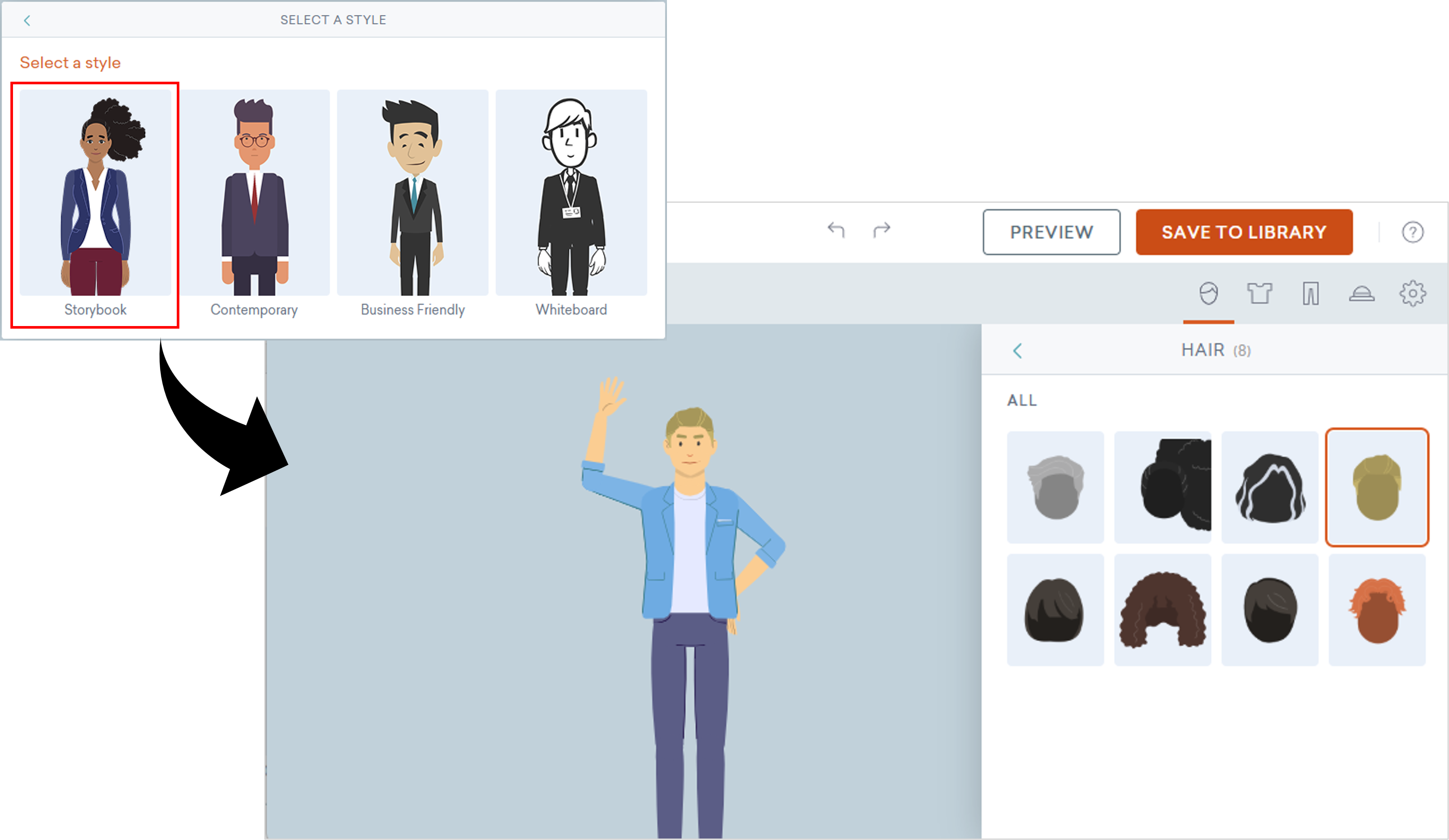
◆How to Use
- On the Vyond homepage, select the "+Create" button and choose "Create a character"
- Select "Select a style" → "Storybook" to move to the character design screen
The characters you create can be embedded into animations/videos you make by following the steps below.
- In the Vyond editing screen, select "Your Characters" from the left menu under "Characters"
- Select and place the character you created
* You can set Actions (movements) for characters equivalent to those in the "Contemporary" style.
◆Other New Features
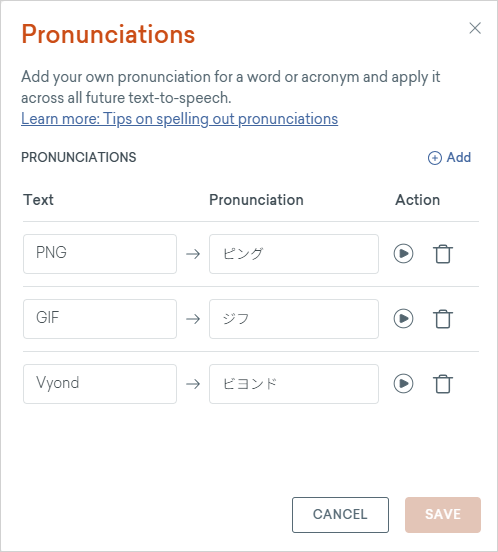
(Synthetic Voice) Creation of Pronunciation Dictionary (Available for: Enterprise/Agency Plans)
Adjusting mispronunciations every time when creating synthetic voice is difficult. This time, with the implementation of the Library (dictionary) feature, it has become easier to prevent mispronunciations.
(AI Avatar) Importing External Audio / Recorded Audio (All Plans)
It is now possible to import audio created or recorded externally into AI Avatars, as well as use audio recorded on the spot.
With custom AI Avatars, you can create your own AI avatar, but there may still be specialized terms or names that cannot be pronounced correctly. For such cases, by selectively using audio you have recorded yourself, you can create higher-quality videos.
(AI Avatar) Template Addition (All Plans)
Ten new templates for utilizing AI avatars have been added. They are highly designed and make it very easy to create avatar videos for purposes such as presentations and education.
◆Summary
The March 2026 update added numerous features across audio, video, characters, and AI avatars that greatly enhance Vyond's expressive power and production efficiency. Please make sure to take advantage of these new features to further expand the range of videos you create with Vyond.
Human Science has extensive experience not only in live-action video production but also in animation video production. Additionally, we offer animation video production outsourcing services using Vyond, and became an authorized reseller of Vyond in 2023. Here, we introduce the benefits of implementing Vyond through Human Science.
-
Comprehensive Support
We provide support for procedures before and after purchase, offer training courses, handle communication with the Vyond provider (in English), and support everything from proposing to producing educational content tailored to customer requests. -
We have extensive experience in e-learning production.
We also have a proven track record of effective animation production outsourcing, not limited to Vyond, leveraging our expertise.
We believe that the enhancement of educational content using animation videos will become increasingly necessary in the future. Correspondingly, various animation video production tools are expected to emerge and their functionalities will continue to improve. The use of AI will also advance. In such a situation, Vyond will be further utilized worldwide as the optimal tool for creating animated educational materials.
To enable even more companies to utilize this valuable tool, Human Science offers a 2-week free trial. Please feel free to contact us.
Additionally, Human Science provides a variety of services related to educational content, ranging from in-house support for content creation to outsourcing the production of animated videos and teaching materials. We would be happy to assist you. We support production using Vyond as well as various other tools.
Furthermore, Human Science has extensive experience in creating manuals for various products and services. Among these are introduction videos for products and services that accompany the manuals, as well as user education content production achievements. In this way, we can provide one-stop support from the proposal and production of manuals and training texts to the proposal and production of educational content. Please feel free to contact us.
Related Services Useful for Vyond Beginners
Vyond License Sales
At Human Science, we offer the following support services to help even first-time Vyond users start video production smoothly.
Human Science Corporation is an official agent and handles contracts for various Vyond plans.

Vyond Usage Guide
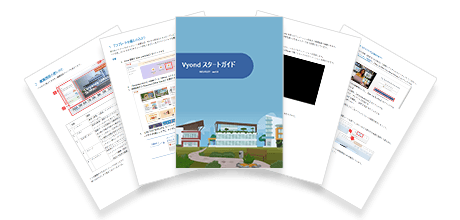
This is a downloadable resource introducing how to use Vyond. It allows you to experience creating an animation from start to finish using the Template Library. Even if you are new to video editing, you can master the basic usage.
Vyond Certified Reseller Human Science
The animation tool Vyond was created by a video production tool development company based in Silicon Valley, USA. In May 2018, they renewed their online animation creation web service and released the "Vyond Platform."
Human Science has a proven track record of video production using Vyond and became a certified reseller in 2023.
Vyond Related Information
- 2026.06.17
- How to Use PowerPoint × Vyond Effectively