







2025.09.26
2026.04.17
What is an LMS? A Clear Explanation of the Basics, How to Use, and Practical Use Cases of Learning Management Systems

-
Category
Recommended Articles
-
[Moodle Manual ③] 2025 Edition | Support Staff Explain How to Set Up and Utilize Forums!
-
[Moodle Manual ②] 2025 Edition|How to Create Quizzes, Setup Procedures, and FAQ Explained by Support Staff!
-
[Moodle Manual ①] 2025 Edition|How to Set Assignments & Tips for Use Explained by Support Staff!
-
What is Vyond? Introducing the benefits of an animation video production tool that can be used for business.
-
[Animation Teaching Material Production] How to Create e-Learning Materials ②
-
How does Vyond differ from other animation production software? Comparison and recommendations
-
Can Vyond animations be used as teaching materials? Here are the benefits of using them in e-learning and training.
-
Let's create business animations with Vyond! An explanation of the reasons and benefits recommended for business, as well as challenges.
-
Vyond Go (AI Video Generation) Tips and Best Practices ① Vyond Go Setup Guidelines
-
Moodle Basic Course: What is Moodle?
-
[Moodle Basic Course] What can the e-learning management system Moodle do?
-
[Moodle Basic Course] What can be done with Moodle's default features
-
Benefits and Considerations of Moodle Cloud Services
-
Moodle is not only used by universities (widespread use)



LMS (Learning Management System) is being increasingly introduced in employee training and educational settings.
However, many people may feel unsure about "What is an LMS?", "How is it different from e-learning?", and "How is it actually used?"
This article provides an easy-to-understand explanation for beginners, covering the basics of what an LMS is, its types and selection criteria, specific usage methods, application scenarios, and case studies.
If you are considering introducing or reviewing an LMS, please use this as a reference.
Table of Contents
1. What is an LMS (Learning Management System)?
1-1. Main Functions of LMS
1-2. Types of LMS
1-3. LMS Selection Points
2. Step-by-Step Explanation of How to Use an LMS
2-1. Registering Users
2-2. Registering Content (e-learning Materials, etc.)
2-3. Assigning Courses to Users
3. LMS Application Scenarios
3-1. Internal Training
3-2. Training Outside the Company
3-3. Educational Institutions
4. LMS Case Studies
4-1. Introduction of e-learning to Promote RPA Utilization
4-2. Providing Emergency Nursing Seminars Online
5. Frequently Asked Questions (FAQ) about LMS
6. Summary
1. What is an LMS (Learning Management System)?
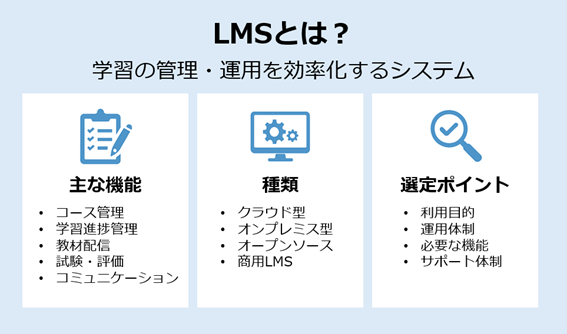
An LMS (Learning Management System) is a system designed to efficiently manage and operate learning and training.
It is widely used in educational institutions and corporate training, with a major feature being the centralized management of learners' study history, progress, and grades.
Traditionally, educational information was managed individually using paper, Excel, or email, but by using an LMS, this information can be consolidated and visualized, simultaneously improving the quality of education and operational efficiency.
1-1. Main Functions of LMS
LMS has various functions that support learning management.
Course Management: Creation, publication, and setting of enrollment conditions for training and courses
Learning Progress Management: Real-time tracking of who has learned what and how far
Content Delivery: Distribution of videos, PDFs, slides, tests, etc.
Examination and Evaluation Functions: Online tests, automatic grading, result aggregation
Communication Functions: Bulletin boards, chat, surveys
By utilizing these, it is possible to reduce the burden on education administrators while improving the learning experience for participants.
1-2. Types of LMS
There are several types of LMS depending on their use and operational policies.
・Cloud-based LMS
A type used via the internet. Easy initial setup and low maintenance burden.
・On-Premises LMS
Built and used on in-house servers. Chosen when security requirements are strict.
・Open Source LMS
Like Moodle, no license fees are required and flexible customization is possible.
・Commercial LMS (Enterprise LMS)
Offers extensive support and enterprise-oriented features, making it easier to standardize operations.
1-3. Key Points for Selecting an LMS
The following perspectives are important when choosing an LMS.
・Is the purpose of use clear? (Employee training / Customer education / Educational institutions, etc.)
・Does it fit the operational structure? (In-house production or assuming external support)
・Are the necessary functions available? (Progress management, tests, reports, etc.)
・Is future expansion and continuous operation possible?
・Is the support system sufficient?
"High functionality = optimal" is not always the case; whether it fits your company's operations is the most important point.
2. Step-by-step Explanation of How to Use LMS

The basic way to use an LMS can be broadly divided into the following three steps.
1. Register users
2. Register materials (content)
3. Assign courses to users
By following this flow, basic operations can proceed smoothly.
2-1. Register the Users to be Used
First, organize "who will learn / who will manage."
Basic Procedure
・Decide attributes such as organization, department, and position: division, location, employment type, job category, position, year of joining, etc. This information can be utilized later for distributing materials and report analysis.
・Decide the user ID assignment rules: employee number base is recommended (less duplication and changes, easier to link with other systems).
・Choose the registration method
→ For a small number: manual registration from the management screen.
→ For a large number: bulk registration via CSV (enter name, email, affiliation, position, etc. according to the template).
→ For continuous operation: automate with HR system integration or directory integration.
Efficiency Tips (HR System Integration)
・Make the HR master data the "source of truth": Update hires, transfers, and resignations in the HR system and automatically reflect them in the LMS.
・Synchronize daily or every few hours: Changes in assignments or new employees can immediately access the correct courses.
・Use attribute rules for automatic course assignment: For example, department = "Sales" and position = "Manager."
Common Pitfalls
・Import errors caused by full-width/half-width characters in names or duplicate emails: Clean data before registration.
・Inactive accounts of retired employees left unattended: Automate deactivation rules to prevent information leaks.
2-2. Register Content (e-learning materials, etc.)
Next, we add "What to learn."
Main Supported Formats
・Videos (mp4, etc.), materials (PDF/slides), web pages, quizzes
・Formats that can record detailed learning history such as SCORM, xAPI packages, and H5P (interactive content) are also effective.
Basic Procedures
・Create a course: Set the title, purpose, target audience, required time, and achievement criteria (e.g., 100% viewing + 80 points or more on the test).
・Consider course design: Make the learning flow clear with introduction → main content → confirmation test → survey, etc.
・Register materials: Upload files or embed external URLs. Attach subtitles or script PDFs as needed.
・Define course requirements: Order of attendance, mandatory/optional, passing criteria, attendance deadline, and whether retaking is allowed.
・Metadata & tags: Tag fields, skills, levels, and target departments → improves searchability and makes course assignment easier.
・Version control: When updating content, clearly indicate version number, revision date, and summary of changes (important for audits and legal compliance).
Key Points at Registration
・Allow playback speed adjustment and resume playback: Enhance the learning experience.
・Decide whether downloading is allowed when distributing materials or videos: Clarify permissions, such as view-only for confidential company documents.
・Consider accessibility for diverse learners: Add video subtitles, set alternative text, improve visibility, etc.
2-3. Assign Courses to Users
Finally, decide "who should take it, by when, and in what order."
Methods of Assigning Courses (Typical Examples)
・Individual Assignment: Manually granted to specific users. Suitable for small-scale or one-off training.
・Group/Department-Based Assignment: Assign courses to attribute groups such as departments or locations. Resistant to personnel transfers.
・Rule-Based Automatic Course Assignment:
Example) "Automatically assign ‘Basic Onboarding’ to new employees within 30 days of their joining date."
Example) "Automatically assign ‘Annual Compliance Update’ every April 1 to supervisors and above in the Sales Department."
・Learning Paths (Course sequence/prerequisites): Stage learning such as pass A → unlock B.
・Deadlines and Reminders: Course deadlines and automatic emails to those who have not completed (days before, on the day, after the deadline).
Notifications and Guidance
・Initial notification email: Clearly state the purpose, required time, deadline, and contact information.
・Announcements on the top page.
・Enabling supervisor notifications promotes follow-up in the field.
Post-Course Confirmation
・Check progress and pass rates on the dashboard: Visualize learning stagnation points by department and position.
・Automatically send lists of incomplete participants: Weekly to responsible persons and supervisors.
・Collect surveys → Improve: Continuously enhance quality with a 1-minute survey after course completion.
By following just these three steps, you can reduce daily manual work while reliably delivering the necessary learning to the right people. Once the operation is running smoothly, it is recommended to further expand automation, such as automatic onboarding at the time of joining and automatic renewal of mandatory annual training.
3. Use Cases of LMS

LMS is utilized not only for employee training but also for external partners, customers, and even educational institutions in various situations. Here, we highlight three representative use cases and explain specifically how it can be beneficial.
3-1. In-house Training
LMS can accommodate a wide range of groups, from company-wide common training to new employee training, tiered training, and training for managers. Since learning histories and progress statuses can be centrally managed, it is immediately clear "who has completed which training." Additionally, by combining videos, texts, and tests, training can be conducted efficiently, allowing education to continue without interrupting on-site work.
3-2. Education Outside the Company
LMS is also effective for training non-regular staff such as part-time and temporary employees, group companies, agencies, and even customers. Because materials can be distributed simultaneously to target individuals across multiple locations, the quality of education can be standardized. In particular, sharing product knowledge and manuals can be quickly communicated through the LMS, leading to improved service quality and increased customer satisfaction.
3-3. Educational Institutions
LMS is widely used by schools and educational service providers for online classes and learning support. It makes it easy to track students' learning progress, and assignments and exams can also be managed online. Furthermore, by utilizing bulletin boards and chat functions, communication between students and teachers, as well as among students themselves, is promoted, enhancing learning effectiveness.
>Moodle is not used only at universities (wide-ranging use)
>How to conduct online training by linking Moodle and Zoom?
>Moodle and IBT – Conducting online exams using the waiting room feature –
4. Examples of LMS Utilization
How is LMS actually useful? Here, we introduce case studies of implementation in companies and academic societies, showcasing results such as improved educational effectiveness and reduced operational burdens.
4-1. Introduction of e-Learning to Promote RPA Utilization

TEPCO Solution Advance Inc. introduced the LMS "Moodle" to promote the use of RPA (Robotic Process Automation), which is essential for improving operational efficiency, within the company.
Previously, they relied on face-to-face training and distributing materials, which placed a heavy burden on the training staff and posed the challenge for learners of "difficulty learning at their own pace." Therefore, they developed e-learning materials and established a system to deliver them on Moodle.
As a result, learners can study RPA from basics to advanced topics at their preferred time and place, improving knowledge retention. Training staff can also manage progress more efficiently, effectively advancing company-wide skill enhancement.
>TEPCO Solution Advance Inc. Case Study
4-2. Providing Emergency Nursing Seminars Online

The Japan Society of Emergency Nursing conducts seminars on highly specialized emergency nursing for nurses nationwide. Traditionally, these seminars were held in-person at venues, which posed significant challenges such as travel burdens for participants and high preparation costs for organizers.
Therefore, they utilized the LMS "Moodle" to move the seminars online. Additionally, by integrating it with the existing portal site, they established a system that allows members to log in and attend smoothly.
As a result, participants can now attend regardless of location, and the society has greatly reduced its operational burden. This has created an environment where specialized knowledge can be delivered to a larger number of nurses.
What these cases show is that LMS is a flexible system that can be applied both to "in-house business skill training" and to the "dissemination of specialized knowledge." By implementing it according to the challenges of your company or organization, you can simultaneously achieve improved educational effectiveness and reduced operational burden.
5. Frequently Asked Questions (FAQ) about LMS
Q1. What is an LMS?
An LMS is a "Learning Management System" used to manage and operate learning and training. It allows centralized management of course progress and grades.
Q2. What is the difference between LMS and e-learning?
E-learning refers to the system or format of learning conducted via the Internet itself.
An educational environment provided by combining learning materials (videos, documents, tests, etc.) with an LMS that distributes and manages them is generally called "e-learning."
On the other hand, an LMS is a learning management system that enables e-learning, serving as the foundational system responsible for material distribution, course management, progress tracking, and grade management.
In other words, the LMS can be said to be the core system supporting e-learning.
Q3. What can you do with an LMS?
You can distribute materials, manage progress, conduct tests, and manage learning histories.
Q4. What types of companies use LMS?
It is widely used by companies that conduct new employee training, compliance training, technical education, and more.
Q5. How should I choose an LMS?
It is important to select one after organizing your purpose of use, operational structure, required features, and support system.
Q6. What types of LMS are there?
There are cloud-based, on-premises, open-source, and commercial LMS types.
6. Summary

LMS (Learning Management System) is an essential framework for streamlining education and training and enhancing learning effectiveness. By understanding how to use it and selecting and operating an LMS that fits your company or organization, you can significantly improve the quality and continuity of education. Our company provides one-stop support centered on Moodle and Totara, from implementation to operational assistance. If you have any concerns regarding the introduction or operation of an LMS, please feel free to contact us.
> Totara Learn Implementation Support
> Moodle Implementation Support
Moodle Related Information
About the Author